The digital marketing world is changing very fast. Today, AI tools for digital marketing are changing how people create content, run ads, and grow businesses. If you are a student of this field in Jaipur, you need to be ahead. Learning AI tools for digital marketing is not optional, now it is becoming essential.
By 2026, manual guesswork will disappear. Smart and best AI tools will handle most tasks. You don’t need coding skills to use them, you just need curiosity and a willingness to learn. These tools help you save time and improve your creativity.
Now, let’s explore the top AI tools you should learn this year.
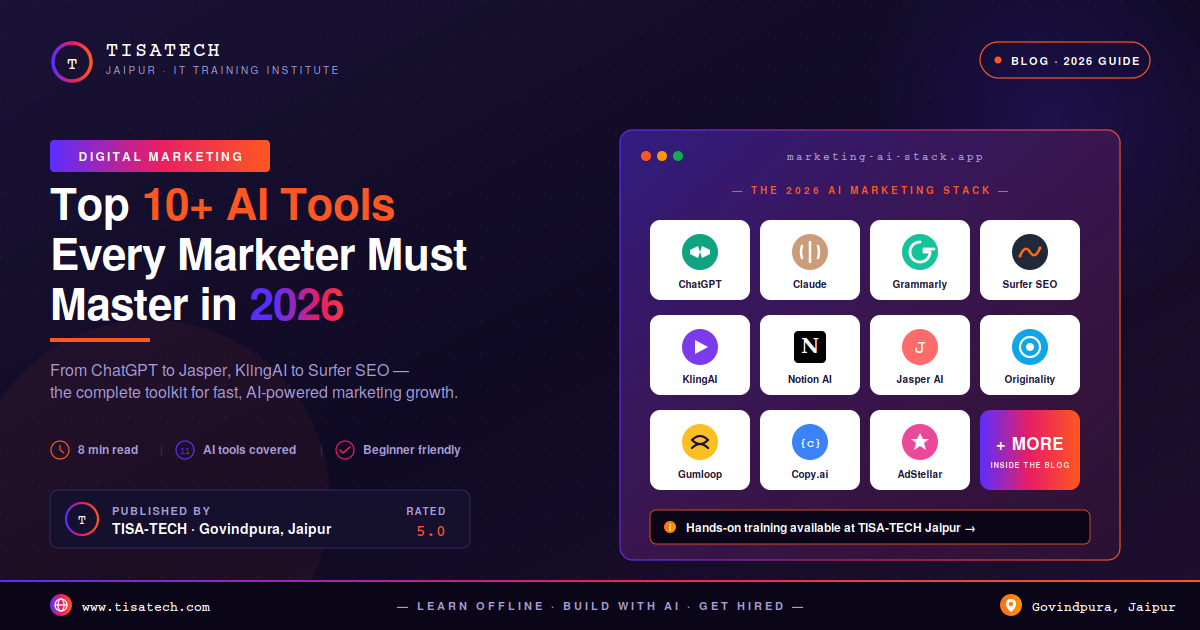
Top AI Tools for Digital Marketing must Learn In 2026
AI marketing tools are smart software that use data and machine learning to make marketing easy. These tools can write content, design posts, manage ads, and analyze performance. Many generative AI marketing tools can create blogs, videos, and images in minutes. This is why they are now a must for every marketer.
Here are top AI tools for marketing:
1. ChatGPT for Digital Marketing
ChatGPT is an easy to use AI tool. It acts as your free marketing assistant available 24/7. It writes posts, emails and blogs in seconds. It saves hours of manual work. For Jaipur marketers it speaks Hinglish which connects better with local audiences. It helps you plan strategy. You can ask anything without fear of judgment. It connects with Canva and Google Sheets easily. In 2026, it will remember your brand style. That makes every reply smarter and more personal.
How to use it?
To use ChatGPT, simply type a question or instruction or prompt into the message box at chatgpt.com. You can ask it to write, summarize, or solve problems. For the best results, provide specific details and follow up with more questions to refine the conversation until you get exactly what you need.
Prompt:- Ex: “Act as a [Professional Role, e.g., Expert Marketer]. I am working on [Project Name/Description]. Please [Specific Task, e.g., write 5 catchy headlines] that focus on [Key Benefit/Feature]. Ensure the tone is [e.g., professional yet witty] and present the results in a [e.g., bulleted list].”
Link: https://chatgpt.com/
 WhatsApp Chat
2. Claude AI for Content Marketing
Claude is known for its natural and human-like writing style. It can handle long content without losing context. This makes it very useful for serious content work. This is why Claude is a strong choice for writing content. It also helps in editing, summarizing, and improving content clarity. Marketers use it to create well-structured and easy-to-read content for their audience. Marketers prefer Claude because it maintains a professional tone and handles complex topics well. It saves time and improves content quality. It is one of the most useful AI tools today.
To use Claude, sign up on its website or open the mobile app. Type your instructions or prompts in the chat box to create content, analyze data, or write code. View and edit your work easily, and upload files to keep your work organized and consistent.
How to use it?
Prompt: Ex: “Act as a Senior Brand Strategist with expertise in [Industry, e.g., Tech/Graphic Design]. I am currently working on [Project Name, e.g., the Tisa Tech brand identity]. I need you to [Specific Task, e.g., draft a 500-word blog post or brainstorm five logo metaphors] that focuses on [Key Values, e.g., modernism and fluid movement].
Structure: [e.g., Use headers and a summary conclusion]
Audience: [e.g., B2B tech executives]
Link: https://claude.ai/
3. Grammarly for Content Editing
Grammarly is a popular tool for content editing. It helps you fix grammar, spelling, and punctuation mistakes in real time. This makes your content clear and professional. Grammarly also suggests better words and improves sentence structure. It is very useful for students, bloggers, and marketers. Marketers use this tool to make their content easy to read and error-free. It also checks tone and clarity, which helps in better communication. It is a useful AI tool for content editing today.
How to use it?
To use Grammarly, install its browser extension, app, or keyboard. As you type, it shows errors and suggestions in real time. Click on them to fix grammar, improve tone, and make your writing clear. You can also upload full documents to check and improve them easily.
Ex:“ Add content”.
“Check this content for grammar, spelling, and punctuation mistakes. Make it clear and easy to read.”
Link: grammarly.com
4. Surfer SEO for content optimization
Surfer SEO is a data-driven tool that optimizes your content to rank higher on Google. It analyzes top-ranking pages for any keyword and provides specific recommendations; including word count, heading structure, keyword density, and related terms. Paste your content into Surfer SEO. It compares your content with top results in real time. Follow its suggestions to improve keywords, structure, and readability. This helps you create SEO-friendly content without confusion.
How to use it?
To use Surfer SEO, open the Content Editor and enter your main keyword. It will show top-ranking pages and give suggestions. Write or paste your content and follow the tips to improve keywords, headings, and structure. Keep editing until your content score improves and becomes SEO-friendly.
Ex: “Add content.”
“Analyze this content and suggest missing keywords, better structure, and improvements for higher ranking.”
Link: surferseo.com
 Instagram Page
5. KlingAI for generating AI video
KlingAI is a powerful tool that transforms text prompts or scripts into professional-quality AI videos in minutes. Simply type your idea and choose a video style (like cinematic, educational, or social media). This tool generates matching scenes, voiceovers, and subtitles automatically. You can customize avatars, add background music, and adjust pacing without any editing experience. Perfect for marketers, educators, and creators who need fast video content. You don’t need cameras and actors, just type your words and KingAI will transform your ideas into high quality video.
How to use it?
To use Kling AI, sign up on its website with your email or Google account. You get free daily credits to create videos. Choose “AI Videos” and pick Text-to-Video or Image-to-Video. Enter a clear prompt in English, describe a specific scene, subject, and camera movement. You can also add negative words to avoid unwanted results. Select duration, size, and mode, then click Generate. Use simple and detailed prompts for better video quality.
Ex: “Create a 10-second video of a young digital marketer working on a laptop in a modern office. Soft lighting, clean background, smooth camera movement.”
Link: klingai.com
6. Notion AI for productivity
Notion AI works as a smart assistant inside your Notion workspace. It helps you write, summarize, brainstorm ideas, and organize work without leaving your documents. You type “/ai” and give a command like “summarize this page” or “create a timeline,” and it quickly gives results. It also fixes grammar, translates text, and extracts key points from notes. Notion AI saves your time by creating content, organizing tasks, and reusing information across pages in an easy way.
How to use it?
To use Notion AI, open your Notion workspace and type “/ai” anywhere on the page. Then write what you want it to do, like write notes, summarize text, create tasks, or draft emails. It will instantly generate results inside your document. You can also ask it to fix grammar, translate content, or organize information. For best results, give clear and specific instructions like tone, word limit, or deadline.
Ex: “Write a short blog post on AI tools for digital marketing in simple language.”
Link: https://www.notion.so/product/ai
7. Jasper AI for copy writing
Jasper AI is a smart tool for writing marketing content quickly. It helps you create ads, product descriptions, emails, and landing pages using ready-made templates. You just choose a template, add your brand details, and Jasper writes the content for you. You can also give simple commands like “write a Facebook ad for a sale.” It supports many languages and can connect with SEO tools. For better results, you can add your brand style so it writes in a consistent way.
How to use it?
To use Jasper AI, log in to your account and start a new project or document. You can use ready-made templates for ads, emails, or product descriptions, or write from scratch in a blank page. Type your prompt and Jasper will generate content for you. You can also use the chat option to get ideas or improve your writing. For better results, set your brand style and upload sample content so Jasper writes in your tone.
Ex: Social Media Ad Prompt
“Create a Facebook ad for a winter sale. Make it short, catchy, and focused on discounts and urgency.”
Link: https://www.jasper.a
8. Originality AI for content detection
Originality AI is a smart tool for detecting AI-generated content and checking plagiarism (Content authenticity check). It helps marketers, publishers, and agencies verify that content is original and not created entirely by AI models like ChatGPT or Claude. This tool is used to find the percentage of AI written content. This tool protects your brand’s reputation, SEO rankings, and trust. It also includes fact-checking and readability scores.
How to Use it?
To use Originality AI, create an account and purchase credits. Paste your content or upload files, then click to scan. The tool checks for AI-generated text and plagiarism, highlighting issues. Review the report and edit highlighted parts to improve originality. You can also scan multiple files and use team folders to manage content easily.
Ex: “Paste 1,200-word blog post into the scanner. Run a full scan for both AI-generated content and plagiarism. Show me the overall percentage score. Highlight any AI sentences in red and any plagiarized matches in yellow. Give me a summary at the top: Pass, Flagged, or Needs Review.”
Link: https://originality.ai/
9. Gumloop for Agentic AI Automatics
Gumloop is a no-code tool for building agentic AI workflows. It automates tasks like data collection, content creation, and API actions using AI agents. You can connect tools, set actions, and run tasks automatically. It is useful for marketers, developers, and businesses to save time and scale operations efficiently.
How to use it?
To use Gumloop, sign up and open the dashboard. Choose a ready template or create your own workflow by adding and connecting simple steps. Each step performs a task like reading data or generating content. Test your workflow, then deploy it. You can run it automatically on a schedule or integrate with tools like Slack for easy automation.
Ex: To generate a blog post
“Write a 1,200-word blog post based on the website content provided. Use a professional but engaging tone. Include an H2 introduction, three main subheadings with detailed paragraphs under each, and a conclusion with a call-to-action. Format with bullet points where appropriate. Target audience: small business owners.”
Link: gumloop.com
10. Copy.ai for Email Marketing
Copy.ai is a helpful AI tool for email marketing. It quickly creates email content like subject lines, newsletters, and campaign messages. You can use ready-made templates or generate custom emails in seconds. It also learns your brand voice and helps maintain consistency. Marketers use it to save time, improve engagement, and create multiple email variations easily for better results.
How to use it?
To use Copy.ai for email marketing, sign up and log in. Choose an email template like “Email Campaign” or “Newsletter.” Enter details such as your topic, audience, and tone. The AI will generate email content instantly. Edit and customize it as needed, then copy it to your email tool and send your campaign.
Ex: Summarize the blog post [paste URL or text] in one sentence. Write a short summary for an email newsletter. Make it interesting so people want to click and read the full blog. Highlight the most important point.
Link: http://www.copy.ai/
11. AdSteller for advertising
AdStellar is a powerful AI platform that helps create, manage, and optimize ads automatically. It can generate ad creatives like images and videos, launch campaigns, and analyze performance in real time. The tool uses past data to improve results and target the right audience. It saves time, reduces manual work, and helps marketers run high-performing ad campaigns efficiently.
How to Use it?
To use AdStellar, sign up and log in to the dashboard. Create a campaign and enter details like your product, audience, and goal. The AI generates ads for you. Review and edit them, then launch your campaign. After that, you track results and let the AI improve performance for better outcomes.
Ex: Image ads generation for IT training institute
“Generate a professional image ad for an IT training institute. Show a diverse group of happy, confident young students in a modern classroom with laptops. In the background, display glowing job offer icons and a ‘100% Placement’ badge. Use a blue and orange color scheme, clean lighting, and text space at the bottom for a headline and CTA button. Marketing style, high resolution, 16:9 aspect ratio.”
Link: –
 Facebook Page
Where to learn AI Tools for Marketing?
TISA-TECH Jaipur is the best place for learning AI marketing tools in Jaipur. This 5.0-rated institute Located in Govindpura. It offers specialized training in AI-powered Digital Marketing covering SEO, social media, Google Analytics, and paid advertising .Their curriculum includes hands-on experience with cutting-edge AI tools like ChatGPT, Claude, and automation platforms . With 100% placement assistance, real-world projects, and expert mentorship from working professionals, TISA-TECH transforms beginners into job-ready marketing professionals.
FAQs Section
Ans. Marketers must learn AI tools in 2026 to automate tasks, create content faster, analyze data, and improve targeting, helping them stay competitive and achieve better marketing results.
Ans. Popular tools include ChatGPT, Jasper AI, Copy.ai, and Originality AI.
Ans. AI tools help in better targeting, faster content creation, and real-time performance tracking.
Ans. Yes, most AI tools are user-friendly and come with templates, making them easy for beginners to start.
Ans. Many tools offer free plans, while paid versions provide advanced features at affordable prices.
Ans. You can learn AI tools from TISA-TECH Jaipur with practical training.
Conclusion
Mastering AI tools is no longer optional, now it is becoming essential for digital marketers. These AI tools improve marketing speed, creativity, and data use in 2026. But tools alone are not enough. You should know AI tools and how to use them.
The best IT institute like TISA-TECH provides hands-on training to turn your knowledge into real skills. You learn through live projects, expert guidance, and placement support, helping you become job-ready and confident in using AI tools.