When you start learning cloud computing or DevOps, you often hear two names: Docker and Kubernetes. They appear in many tutorials and job descriptions, but beginners often find them confusing.
Before understanding these tools, let’s quickly understand cloud computing. Earlier, companies bought expensive servers to run apps and websites. Today, they rent servers over the internet and pay only for what they use. This is called cloud computing. Docker and Kubernetes help companies run apps smoothly on these cloud servers.
In this guide, you will learn Docker vs Kubernetes in simple language. By the end, you will understand what both tools do and when to use them.
What is Docker?
Think about cooking. You make a dish at home and it tastes great. But when you cook the same dish at your friend’s house it tastes different. The stove, utensils or ingredients are not the same so the result changes.
Software works in the same way. Your code runs fine on your laptop but when you move it to another computer or a server it may stop working. A setting might be missing or a version might be different. Developers faced this problem for years.
Docker solves this problem. It puts your app and everything it needs into one box called a container. Inside the box you have your code, settings and files. You can run this box anywhere on your laptop, on a cloud server or on another computer. It will always work the same.
So Docker is like a neat box for your app. It is fast, light and simple to learn. That is why students and beginners like it.

What is Kubernetes?
Imagine your app becomes popular. Thousands of people start using it. One container is not enough. You need many containers running together. Someone has to manage them.
Doing this by hand is very hard. You must start each container. You must check if any container crashed. You must add more when traffic goes up. You must remove some when traffic goes down. Managing all this manually is almost impossible.
Kubernetes solves this problem. It works like a manager for your containers. It runs many containers across many machines. If one fails, Kubernetes starts it again. If more users join, Kubernetes adds more containers.
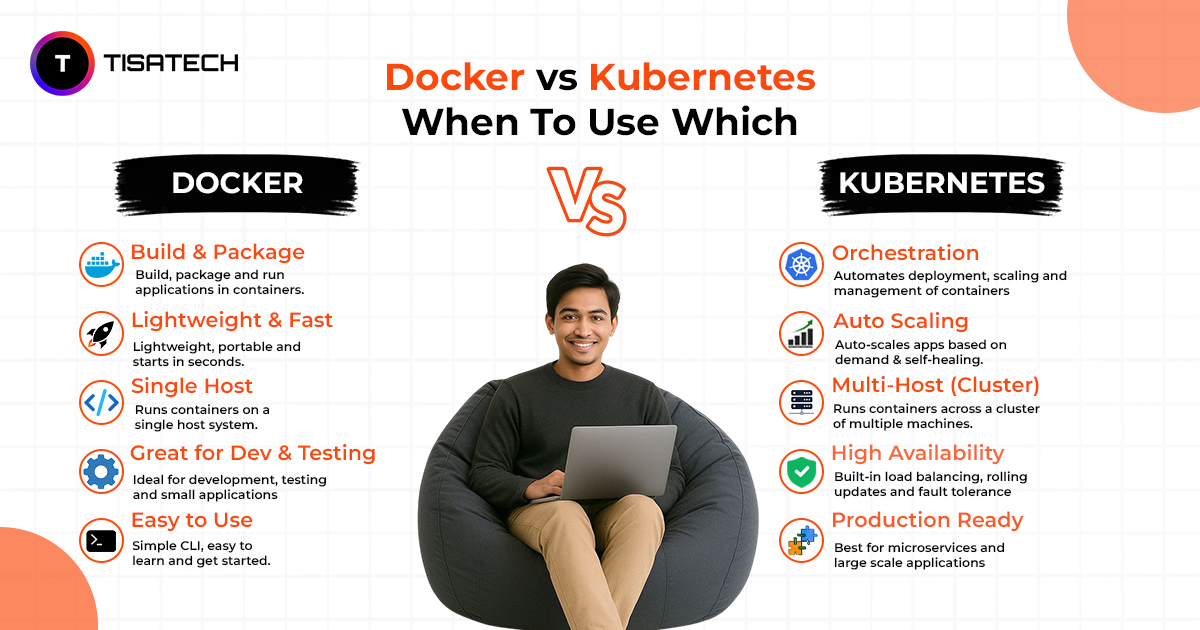
In short, Docker makes the boxes and Kubernetes manages those boxes. This work is called container orchestration. That is the basic idea of Kubernetes vs Docker explained.
Difference between Docker and Kubernetes
Many students think Docker and Kubernetes are enemies. They are not. They work together.
Docker makes and runs containers. Kubernetes manages many containers at the same time. One builds. The other organizes. The difference is not about which is better. It is about what each one does.Think of it like moving to a new house:
Docker is like putting your books into boxes.
Kubernetes is like the moving company that carries the boxes, keeps them safe, and replaces any box that breaks. You need both for a smooth move.
Here is a simple comparison: Docker vs Kubernetes
| Point | Docker | Kubernetes |
|---|---|---|
| Main job | Builds and runs containers | Manages many containers |
| Best for | Learning and small projects | Large live projects |
| Ease of use | Simple and beginner friendly | Powerful but complex |
| Machines | Usually one machine | Many machines together |
| Auto recovery | Manual | Automatic restart and scaling |
| Scaling apps | Limited, needs manual setup | Automatic scaling across servers |
| Networking | Basic container networking | Advanced service discovery and load balancing |
| Storage | Local volumes | Persistent storage across clusters |
| Updates | Manual container updates | Rolling updates with zero downtime |
| Monitoring | Basic logs | Built-in monitoring and health checks |
| Real world use | Student projects, prototypes | Enterprise apps, cloud-native systems |
In short, Docker builds the boxes and Kubernetes manages them, and together they make apps run smoothly.
Docker vs Kubernetes : When to Use Each One
This is the most important question. Let’s keep it very simple.
Use Docker when:
- You are learning and making small projects.
- You want to test your app on your laptop.
- You are working on a college assignment or a personal website.
- You have only one or two containers.
In these cases Docker is enough. This is why Docker vs Kubernetes for small projects almost always ends with Docker winning. Using Kubernetes here is like hiring a bus driver to take one person to the shop.
Use Kubernetes when:
- Your app is live and many people use it.
- You have many containers that must run together.
- You want your app to stay online even if something fails.
- You want your app to grow or shrink based on traffic.
In these real situations Kubernetes is the right choice. It does the hard work that people cannot do by hand all day.
The advice is clear. Start with Docker. Learn it well. Use Kubernetes only when your project grows bigger and needs more power. This is the simple idea of Docker vs Kubernetes for beginners.
Also Read: Cloud Computing Roadmap 2026: A Student’s Guide to Becoming a Cloud Engineer in India
A Real World Deployment Example
Imagine you and your friends build a food delivery app for your college. At first only a few students used it. You put the app in a Docker container and run it on one small server. It works fine. Cheap, simple, and easy to manage. At this stage you do not need Kubernetes.
Later the app became popular. The whole campus starts ordering food at lunch. Thousands of orders come in at once. One container cannot handle this. The app slows down and sometimes crashes.
This is where Kubernetes helps. It runs many copies of your app on several servers. At lunch it adds more containers to handle the crowd. After lunch it removes the extra ones to save money. If any container crashes, Kubernetes restarts it quickly.
So the journey is simple. Start small with Docker. Use Kubernetes when your app grows bigger and needs more power. Both tools help at different stages.





Build Cloud Skills at TISA‑TECH
Reading about Docker vs Kubernetes is a good start. But real learning happens when you build projects and learn from a mentor.
At TISA‑TECH, the top IT training institute in Jaipur, trainers explain cloud and DevOps in clear words. Simple teaching, daily practice, and real projects. Our cloud computing courses in Jaipur take you from basics to advanced skills. Step by step, you learn how to use containers and manage them like a pro. We also care about jobs after learning. That’s why we run strong internship programs. You work on live projects and gain the experience companies want.
If you are a student in Jaipur and want a career in cloud computing, join us. We help you turn curiosity into job‑ready skills.
Conclusion
Docker and Kubernetes work together. Docker packs apps into containers. Kubernetes manages many containers when projects grow big. Start with Docker to learn the basics. Move to Kubernetes when your app needs more users. Most teams use both.
At TISA‑TECH, we teach Docker and Kubernetes step by step with practice and projects. Our courses in Jaipur help you build real skills, and our internships give you the experience companies want