A few years ago, video editing was just a side skill for passionate people. Now things have changed fast. TechCrunch quoted Rajan Anandan from Peak XV saying India is a “video-first market.” In simple words, video beats text everywhere – apps, social platforms, and e-commerce.
That shift turned editing from a hobby into a serious career. Today, the right editing skills decide who gets big projects and who gets left behind.
The numbers make the story clear. Data shows how fast video is growing and how strongly it is shaping careers. BusinessToday says India now has 3.5 to 4.5 million creators, almost three times more than before. Brands are spending record money on video. Creator-led commerce could add $25 billion to Indian e-commerce by 2030. Research & Market report shows the global video editing software market will hit $2.68 billion by 2026. AI editing tools and cloud rendering are becoming normal features, not extras.
For editors in Jaipur or any Tier 2 city, this is both exciting and confusing. New software launches every few months. Each one claims to be the fastest or smartest. Professionals don’t have time to test them all. They just need one clear answer: which video editing software in 2026 is best for professional work.
This guide gives that answer. It looks at the top tools editors in India actually use, explains their strengths and limits, and helps you pick the right one. Whether you want quick social content, cinematic color grading, or heavy VFX, there’s a tool made for it.

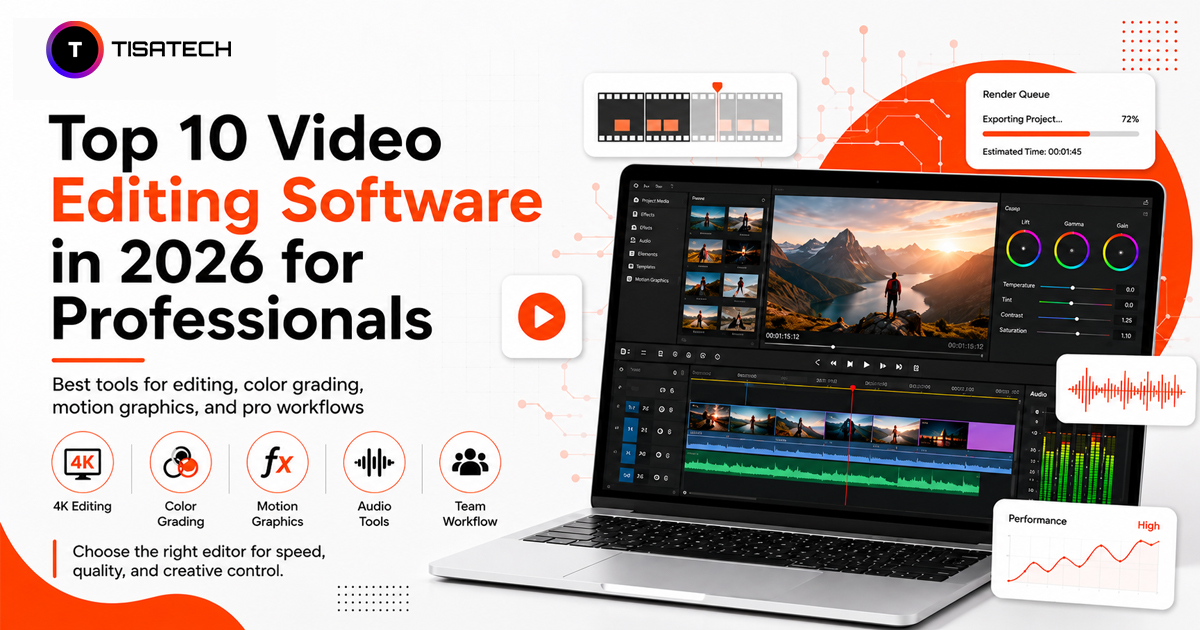
The Top 10 Video Editing Software Professionals Are Using in 2026
Editors today have more choices than ever. But only a few tools stand out as the real favorites for professional work. Here are the top video editing software options professionals are using in 2026.
1. Adobe Premiere Pro
Premiere Pro remains the most widely used option among agencies, YouTubers, and broadcast teams in India. It connects directly with After Effects for motion graphics and fits naturally into the wider Adobe Creative Cloud ecosystem. Editors who work across multiple Adobe apps save real time on every project because of this integration. Built in AI tools, including automatic scene detection and audio cleanup, make Premiere Pro one of the more capable professional video editing tools available today. The subscription cost feels steep for freelancers just starting out, but the skill transfers into almost every studio and agency job across the country.
2. DaVinci Resolve
Filmmakers and independent creators rely on DaVinci Resolve because its color grading tools deliver Hollywood‑level quality on a normal desktop. The software uses a node‑based system that gives editors full control over how their footage looks. The free version has very few limits, which makes it popular among students and freelancers who want to build a portfolio without spending much money. Resolve also includes Fairlight for audio mixing and Fusion for visual effects, all inside the same app. This means editors don’t need to switch between different programs to finish a project. Among all professional video editing apps, Resolve stands out as the strongest free‑to‑start option in 2026.
3. Final Cut Pro
Editors who work on Mac still choose Final Cut Pro mainly for speed. Render times stay fast even when the timeline is long, so projects finish quicker. The magnetic timeline makes it easy to move clips around without breaking sync, which saves time during edits. Final Cut Pro works only on Apple devices, so it fits professionals already inside that ecosystem. News editors and short‑form content creators often pick it because they need quick turnarounds. For anyone focused on speed and efficiency, Final Cut Pro remains a strong choice in 2026.
4. Avid Media Composer
Big film studios and TV networks still rely on Avid Media Composer for large productions. Its shared storage system allows many editors to work on the same project at once without version conflicts, something very few tools handle smoothly. Avid also keeps media organized even when projects have thousands of clips. This makes it the standard choice for big editing teams that need to deliver on tight broadcast deadlines together. In 2026, it remains the trusted tool for large‑scale professional work.
5. Wondershare Filmora
Wondershare Filmora works well for small businesses, influencers, and corporate teams who want strong results without spending months learning complex tools. It combines easy operation with useful audio and color features that actually make a difference in editing. Recent updates added AI tools like automatic background removal and smart color matching, which save time and improve quality. For creators looking for the best AI‑powered video editing software in 2026 at a reasonable price, Filmora is worth serious consideration. It balances simplicity with professional features, making it a practical choice for many editors.
6. CyberLink PowerDirector
PowerDirector offers a complete set of professional tools in a desktop editor that still feels easy for newer editors to use. It includes AI features like motion tracking, voice removal, and one‑click color adjustments, all of which save significant editing time. Freelancers working with clients on tighter budgets often choose PowerDirector because it delivers results close to professional studio suites without the high cost. In 2026, it remains a practical option for editors who want strong output at a lower price.
7. Vegas Pro
Vegas Pro, supported by Boris FX, combines fast non‑linear editing with strong compositing tools. It also includes AI features such as noise reduction and auto captions. The interface is designed for editors who prefer a customizable workspace. Vegas Pro works well for corporate videos, documentary projects, and any editing job that requires precise audio and visual control in one place. It remains a reliable option for professionals who want flexibility and detailed control.
8. EDIUS Pro
News broadcasters and event videographers rely on EDIUS Pro because it edits in real time and supports many formats without delays. Unlike tools that force long render times before preview, EDIUS shows results instantly. For anyone shooting live events, weddings, or breaking news in Jaipur or elsewhere, this real‑time capability saves hours of work. That speed makes EDIUS Pro a trusted choice for professionals who cannot afford to wait during fast‑moving projects.
9. Kdenlive
Kdenlive shows that open‑source software can compete with paid options. It runs on the MLT Framework, stays stable even on modest hardware, and gets frequent updates from an active community of contributors. Students and beginner professionals often choose Kdenlive because it allows them to learn editing without paying subscription fees. Many start here to build skills and later move on to paid tools once they need advanced features.
10. Descript
Descript takes a unique approach by allowing editors to cut video through a text transcript, almost like editing a document. This makes it one of the fastest tools for podcasts, interviews, and talking‑head content. It also includes AI features such as voice cleanup and filler word removal, which save a lot of time on dialogue‑heavy projects. Because of this, Descript has become one of the best options for professionals working with spoken content in 2026.
Video Editing Software Comparison 2026
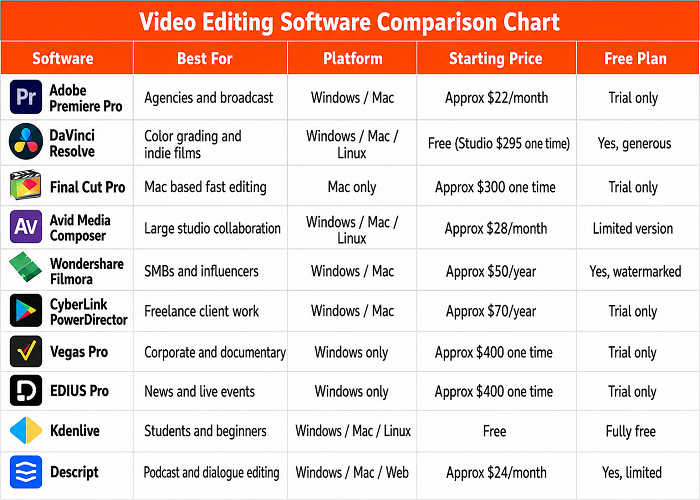
Every tool on this list carries its own price tag, platform limits, and ideal use case. Comparing them side by side makes the decision much easier than reading ten separate reviews. The table below breaks down pricing, platform support, and the best use case for each software at a glance.





Learning Video Editing the Right Way in Jaipur
Learning video editing is not just about downloading software and trying random tutorials. Tools like Premiere Pro and DaVinci Resolve are great, but they don’t turn anyone into a pro by themselves. Real growth comes from structured practice, honest feedback, and live client projects that show exactly what agencies and clients expect today.
That’s why TISA-TECH in Jhotwara makes a big difference. It’s an AI-based training institute where design, editing, and AI-assisted editing are taught together, not separately. Students learn how to mix traditional tools with modern AI workflows, guided by trainers who know what the industry demands in 2026.
On top of that, the institute offers strong placement support. With more than 50 hiring partners, students move straight from classroom practice to paid projects. This closes the gap that free tutorials usually leave open, giving learners confidence and real-world experience.
For anyone in Jaipur serious about building a stable career in video editing, this kind of guided, project-based learning is the smarter path. It’s practical, career-focused, and designed to take you from beginner to professional who can actually deliver results for clients.
Conclusion
In 2026, the choice of video editing software is really about the kind of work you do and the money you want to spend. Premiere Pro and DaVinci Resolve are the main picks for agency and film projects. Final Cut Pro is best for Mac users who want speed. Freelancers often go for lighter, cheaper tools like Filmora or PowerDirector, while Descript is perfect for editing dialogue-heavy content.
No single software covers everything, so many professionals keep two or three installed and switch depending on the project. The smart move is to start with the tool that fits your current skills and client needs, then move to heavier options as you grow.
FAQs Section
Ans. DaVinci Resolve and Kdenlive both offer full features for free, making them the easiest starting points for beginners who do not want to spend money before they build confidence in their skills.
Ans. Yes. Agencies and production houses across India list it as one of the most requested skills in job openings, and its integration with After Effects adds extra value for motion graphics work.
Ans. Descript and Filmora both use AI to cut editing time significantly, especially for dialogue heavy content and quick social media edits.
Ans. Yes. DaVinci Resolve’s free version and Kdenlive both support professional grade output. Many working editors in India built their first portfolios entirely on free tools before upgrading to paid ones.
Ans. TISA-TECH in Jhotwara, Jaipur offers structured, project based training in video editing and design tools, backed by placement support and industry connections.