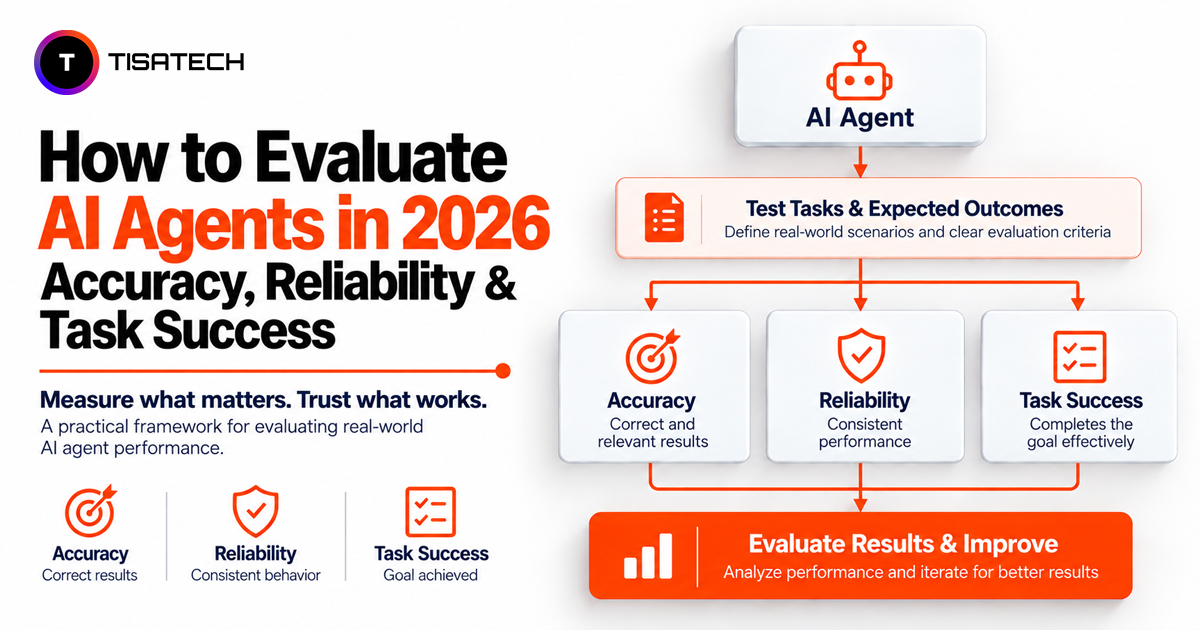
Building an AI agent is only the first step. You also need to check whether it follows instructions, uses the right tools, and completes tasks correctly. An agent might generate a convincing response but still fail to perform the requested action.
As AI agents take on more complex tasks, reliability has become an important part of AI development in 2026. Stanford HAI’s 2026 AI Index Report highlights that AI agents still struggle with tasks that require them to interact with software and complete multiple steps. This makes systematic testing essential before relying on an agent for real-world tasks.
For students learning Python, machine learning, or AI development, evaluating an AI agent is a practical way to understand how AI applications work beyond generating text. By testing an agent against expected results, you can identify errors, measure task success, and learn how to improve its reliability.
This guide explains the key AI agent evaluation metrics, testing methods, useful frameworks, and a practical Python project you can build to develop your testing and debugging skills.

How Does AI Agent Evaluation Work?
Evaluate the agent’s complete execution, not just its final response. Track how it plans the task, selects tools, processes results, and verifies the outcome. A mistake at any stage can cause the task to fail, even when the final response sounds correct.
Save a trace for every run. A trace is a record of each plan step, tool call, and result. Tools like Langfuse and LangSmith collect traces for you. Langfuse lets you review an agent’s traces and costs, while LangSmith helps you trace failures, debug steps, and test multi-step workflows. Without traces, you can see that the agent failed but not where.
Example: A Failed AI Agent Trace
Suppose a user asks an AI agent to issue a refund for order #1042. The trace shows:
| Step | Agent action | Result |
|---|---|---|
| 1 | Called search_orders |
Order found |
| 2 | Checked refund eligibility | Order eligible |
| 3 | Called search_orders again instead of issue_refund |
No refund issued |
| 4 | Replied, “Your refund has been processed” | Incorrect success message |
The task failed because the agent selected the wrong tool and claimed success without verifying the outcome. To fix this, check tool selection and require the agent to verify the refund status before confirming completion.
How Do You Measure AI Agent Task Success?
Task success is the first number to track. Divide the tasks the agent finished correctly by the tasks you gave it. If it passes 40 out of 50 tasks, your AI agent task success rate is 80%.
The key is to verify what the agent actually did, not what it claims to have done. For a calendar task, check whether the event exists with the correct date and time instead of relying on the agent’s confirmation.
Use hard checks wherever you can. Check the database row. Check the API response. Check the file the agent had to create. If the task was code, run the code.
Write the pass rule before you run the test. A good rule is clear enough that two experts reach the same verdict alone. If your rule is vague, your score will be vague too. For more guidance, see OpenAI’s evaluation best practices.
A single success rate cannot explain why an agent fails. If it fails 20% of tasks, examine each failed run to determine whether poor planning, incorrect tool selection, or invalid inputs caused the problem. So write a short note for every failed task.
What Metrics Are Used to Evaluate AI Agents?
No single metric captures an agent’s overall performance, so evaluate six areas: task success, tool use, reliability, process quality, safety, and cost and speed.
| Evaluation area | What to measure | Example metric |
|---|---|---|
| Task success | Whether the agent achieved the requested outcome | Successful tasks ÷ total tasks |
| Tool use | Whether the agent selected the correct tool and supplied valid inputs | Correct tool calls ÷ evaluated tool calls |
| Reliability | Whether the agent succeeds consistently across repeated attempts | passk |
| Process quality | Whether the agent follows an efficient path and recovers from errors | Average steps per task, recovery rate |
| Safety | Whether the agent follows permissions and approval requirements | Policy violations, unauthorized actions |
| Cost and speed | Resources and time needed to complete a task | Cost per successful task, median latency |
Consider a meeting-booking task. The agent must select the correct calendar tool, provide valid event details, create the event, and verify that it was saved successfully. A correct tool call alone does not guarantee task success.
For a meaningful evaluation, report the test-set size alongside each percentage. A 90% success rate across 10 tasks provides less evidence than the same rate across 1,000 representative tasks.
Safety metrics
Check whether the agent verifies permissions before taking action, blocks unauthorized requests, and follows required approval steps. For example, test whether the agent refuses to process a $500 refund without the required approval. If it issues the refund anyway, record it as a safety violation, even if the refund request itself is valid.
Cost metrics
Track cost per successful task by dividing the total evaluation cost by the number of successfully completed tasks. For example, if 50 successful tasks cost $25 in total, the cost per successful task is $0.50.
How Do You Test If an AI Agent Is Reliable?
Reliability measures whether an AI agent can complete the same task correctly across repeated attempts. A single successful run is not enough to establish consistent performance.
Two useful metrics are pass@k and pass^k:
- pass@k: The proportion of tasks for which at least one of k attempts succeeds.
- pass^k: The proportion of tasks for which all k attempts succeed.
The τ-bench benchmark uses pass^k to assess consistency in tool-based agent interactions. It evaluates task outcomes against defined goal states rather than relying only on the agent’s final message.
For example, suppose an agent succeeds on 75% of individual attempts. If attempts are independent and the success probability remains constant, the probability of succeeding on all three attempts is:
Estimated pass³ = 0.75³ = 42.2%
This is a theoretical estimate, not a measured reliability score. In practice, calculate pass^k directly from repeated runs of the same tasks. Agent attempts may share failure patterns, so independence should not be assumed without evidence.
Which AI Agent Evaluation Framework Should You Use?
A strong AI agent evaluation framework has four parts.
1. Grading: Check Whether the Result Is Correct
Use two types of checks:
- Hard checks: Verify measurable outcomes, such as database states, API responses, and code output.
- LLM-as-a-judge: Use a language model to score qualities such as response relevance and reasoning quality when simple rules are not enough.
Test the AI judge using examples rated by humans. Start with 50-100 examples if possible, and use more if the results are inconsistent or the task is high-risk. Compare the AI judge’s scores with human ratings and improve the evaluation criteria when they often disagree.
2. Human Review: Verify Automated Scores
Some cases need a person to check the results. Review a random sample of completed tasks to catch errors that automated checks may miss.
3. Test Levels: Check Individual Steps and Complete Tasks
Test small components while building the agent, then test the complete workflow.
- Component-level tests: Check individual functions, tool selection, and search quality.
- End-to-end tests: Follow a user request from the first message to the final result to verify that the agent completes the entire task.
Public benchmarks can also guide your evaluation. GAIA benchmark for AI assistants tests general AI assistants, SWE-bench for software engineering evaluates agents on real software engineering tasks, and τ-bench for tool-based agents tests agent performance in tool-based environments with defined rules.
4. Automation: Run Tests After Every Change
Automate evaluations as your test set grows. Promptfoo for prompt and security testing helps compare prompts and test security risks, while DeepEval for automated AI evaluations supports automated evaluations using defined metrics and criteria.
Whenever a real user encounters a failure, turn that case into a new test. This helps the test set reflect actual problems and makes it easier to catch recurring errors before they reach more users.
AI Agent Evaluation Tools: Quick Comparison
| Tool | Best starting use |
|---|---|
| Langfuse | Traces, observability and cost tracking |
| LangSmith | Agent workflow debugging and evaluation |
| Promptfoo | Prompt comparisons and security testing |
| DeepEval | Automated evaluation with defined metrics |
How Can You Build Your First Test Set This Week?
You can start small. Follow these steps.
Day one: collect 20 real tasks. Use support tickets or common user requests. Include a few messy ones.
Day two: write the expected result for each task. Describe the final state. For example, the calendar has one event at 4 pm.
Day three: run each task five times. Save the full trace of every run.
Day four: Calculate the overall task success rate across all runs. Then calculate the observed pass⁵ rate by dividing the number of tasks that succeeded in all five attempts by the total number of tasks tested. This shows both overall performance and consistency.
Day five: group the failures. Identify the most common failure pattern, fix its underlying cause, and rerun the entire test set to check whether the change improves performance without introducing regressions.
Keep the test set fixed. If you change the tasks each time, you cannot tell whether the agent improved. Add new tasks in a separate batch. Keep a separate set of unseen test cases for a final check. This helps you determine whether the improvement generalizes beyond the examples you used while debugging.
Common Mistakes to Avoid When Evaluating AI Agents
Even a well-designed evaluation can produce misleading results if the testing process has gaps. Avoid these common mistakes:
- Grading only the final answer: Check tool calls, intermediate steps, and the actual result. A confident response does not prove the task was completed.
- Running each task only once: Repeat tests to identify inconsistent behavior, especially for high-risk actions.
- Ignoring safety and permissions: Test whether the agent blocks unauthorized actions and requests approval when required.
- Skipping checks after a fix: Rerun previously successful test cases after every meaningful change to make sure the fix has not broken something that was already working.
- Relying only on automated scores: Review a sample of results manually to catch grading errors and failures that automated checks may miss.
| Follow Us for Daily Tech Tips |



|
Build an AI Agent Testing Project at TISA-TECH, Jaipur
Students at TISA-TECH, Jaipur, can use Python programming and machine learning concepts to build a practical AI agent testing project. They can create test cases, check the agent’s answers, and run the same tests multiple times to see whether it gives consistent results.
In this project, students can build a Python script that tests an AI agent, records the tools it uses, tracks how many tasks it completes successfully, and generates a report of failed tests. For example, if an AI agent uses the wrong tool or gives an incorrect answer, students can identify the problem and test whether their changes fix it.
By working on this project, students can practice writing Python code, finding errors, analyzing results, and improving AI applications. They can also strengthen their programming foundation through TISA-TECH’s Python programming course in Jaipur.
Conclusion
Evaluating an AI agent means checking more than whether it gives the right answer. You need to verify task completion, tool selection, reliability across repeated runs, and compliance with safety rules. Metrics such as task success rate, pass^k, and cost per successful task help you understand where an agent performs well and where it needs improvement.
FAQs Section
Ans. No. Accuracy checks whether an answer is correct, but an agent can still use the wrong tool or violate a rule. Evaluate the complete execution path.
Ans. The target depends on the task’s risk. Low-risk tasks may tolerate occasional failures, while agents that move money or modify important records need stricter success criteria and appropriate approval controls.
Ans. Start with 20 representative tasks to establish a baseline. Include common requests, edge cases, and likely failure scenarios. Expand the test set as you discover new problems, and use a separate set of unseen tasks to check whether improvements generalize.
Ans. No. A spreadsheet, clearly defined pass criteria, and a simple script can be enough. Tools such as Promptfoo or DeepEval can help automate evaluations as your test set grows.
Ans. Run evaluations whenever you change the prompt, model, or tools. Repeat them regularly after launch to identify regressions and changes in real-world performance.