A student uses ChatGPT to understand a difficult topic. A student checks Google Maps for the fastest route to college. Someone receives a product recommendation while shopping online. These everyday activities show how artificial intelligence (AI) is already part of daily life. For anyone exploring artificial intelligence for beginners, understanding the technology behind these examples is a useful starting point.
AI has also become common in workplaces. According to the NASSCOM AI Adoption Index (December 2025), 87% of enterprises in India are actively using AI solutions. The Government of India’s February 2026 AI@Work backgrounder highlights this finding, showing how AI is becoming relevant across industries and workplaces.
However, using an AI tool and understanding how it works are two different things. A person may know how to write prompts in ChatGPT but still struggle to explain machine learning, neural networks or generative AI. This guide covers essential AI basics, explores common AI tools, explains their limitations and provides a practical roadmap for anyone interested in learning AI from scratch.
The good news is that beginners do not need an advanced mathematics background or programming experience to understand artificial intelligence. They can start with everyday examples, learn the basic concepts and gradually move towards technical skills such as Python and machine learning.

What Is Artificial Intelligence in Simple Words?
Artificial intelligence (AI) is a branch of computer science that enables machines to perform tasks that usually require human intelligence. These tasks include understanding language, recognising images, solving problems, making predictions and supporting decisions.
Unlike traditional software, which follows instructions written by programmers, some AI systems can learn patterns from data and use them to handle new situations. For example, a traditional program might flag an email as spam using fixed rules. A machine learning model can study thousands of spam and genuine emails to identify patterns that help it classify new messages.
Think about how a child learns to recognise a mango. After seeing different mangoes, the child starts recognising common features such as shape, colour and texture. Machine learning works in a similar way. It studies examples, identifies patterns and applies what it has learned to new data. This approach helps AI systems recognise objects, understand speech and make predictions without requiring a programmer to write a separate rule for every situation.
AI does not think or feel like a human. It uses programmed rules or trained models to process information and provide answers. For example, a chatbot can explain a topic in natural language, but that does not mean it understands everything or always gives correct information.
The idea of artificial intelligence is not new. Researchers started working on AI in the 1950s, and the term “artificial intelligence” was introduced at the 1956 Dartmouth Summer Research Project. Early AI research focused on solving math problems and playing simple games. Over time, better computers, more data and improved learning methods helped researchers develop AI systems that could work with language, images and decision-making.
Today, AI includes many technologies, from simple rule-based programs to advanced machine learning models. Understanding these basic differences helps beginners learn how modern AI tools work.
Where Do People See AI in Daily Life?
AI is already part of many everyday activities. People often use it through familiar apps without thinking about the technology behind them.
On smartphones, AI helps unlock phones with face recognition, convert speech into text and suggest words while typing. Email services also use it to identify spam and suspicious messages. Some camera apps use AI to improve photos by adjusting details such as lighting and sharpness.
Entertainment and shopping apps use AI to personalise what people see. Streaming platforms recommend shows based on viewing history, while music apps suggest songs that match listening habits. Social media platforms rank posts and videos based on user activity. Online stores also recommend products by analysing searches, clicks and previous purchases.
Travel and banking apps also use AI in different ways. Navigation apps check traffic conditions to suggest faster routes and estimate travel times. Ride-hailing apps use AI to estimate fares and connect riders with drivers. Banks analyse spending patterns to identify unusual payments that may be fraudulent. They may ask customers to verify such payments before completing them. Google explains how AI supports services such as Maps and Photos.
Healthcare and education are other areas where AI is useful. AI systems can examine X-rays and other medical images to help doctors identify possible health problems. Learning platforms can track a student’s progress, find topics they struggle with and suggest extra practice. These tools help doctors and teachers in their work rather than replacing their decisions. The PRS Legislative Research brief on AI explains how AI is used in healthcare, education, finance and transport.
AI can also help small businesses in Jaipur with everyday tasks. A clothing store can use AI to write product descriptions, a coaching centre can use a chatbot to answer common student questions, and a local shop can create social media captions in English and Hindi. Many of these tasks can be handled with existing AI tools without building a custom system.
All these examples show how AI works in daily life. It studies information, finds patterns and uses them to make predictions, suggest options or create content. AI is not just about robots or advanced technology. It is already part of many apps and services people use every day.
How Does AI Work Behind the Screen?
To understand how AI works, it helps to follow how a machine learning model moves from raw data to real-world use. The process usually involves collecting and preparing data, training a model, testing its performance and deploying it. Teams then monitor the model and update it when needed.
1. Collect and prepare data
Data gives a machine learning model examples to study. A spam filter uses emails labelled as spam or genuine. An image recognition system uses pictures of different objects. A translation model learns from text in different languages.
However, raw data often contains missing values, incorrect entries or duplicates. Data teams clean and organise it before training so the model can work with more reliable information. The quality and variety of this data matter because incomplete or biased examples can lead to inaccurate results.
This is also where data science plays an important role. It helps teams collect, prepare and analyse data before using it to build machine learning models.
2. Train the model
During training, a machine learning model studies the prepared data and adjusts its internal parameters to identify useful patterns. In supervised learning, it compares its predictions with known answers and uses the errors to adjust those parameters. It repeats this process until it learns patterns that help it make better predictions.
For example, a spam filter studies emails marked as spam or genuine. It learns which words, links and other features commonly appear in each category. It can then use those patterns to classify new emails.
3. Evaluate the model
A model needs to work well with new data, not just the examples it used during training. Engineers test it with separate data that it has not seen before. They check how accurate its predictions are and look for mistakes, bias or other problems.
If the model does not perform well, the team may improve the training data, make changes to the model or try another method. This testing helps engineers check whether the model can handle new situations instead of simply remembering the examples it learned from. Google’s guide to dividing machine learning datasets explains why training, validation and test data are kept separate.
4. Deploy and monitor the model
After evaluation, engineers can integrate the model into an app or software system. When a new email arrives, for example, the spam filter analyses it and predicts whether it belongs in the inbox or spam folder. This process of using a trained model to produce predictions is called inference.
Deployment does not mean the work is over. Teams monitor the model’s performance and check whether changes in data affect its results. If its performance drops or the task changes, they may update the data and retrain the model. However, most models do not learn automatically from every new input after deployment.
Machine learning also uses different training approaches. The three common ones are:
- Supervised learning: The model learns from labelled examples, such as emails marked as spam or genuine.
- Unsupervised learning: The model finds patterns or groups in data without pre-assigned labels. A shop might use it to group customers with similar buying habits.
- Reinforcement learning: The model learns through actions and feedback. It receives rewards for useful actions and penalties for poor ones. Game-playing systems often use this approach.
These approaches help models solve different kinds of problems. The Microsoft guide to the machine learning lifecycle explains how data preparation, training, evaluation, deployment and monitoring fit into a complete project.
What Are Machine Learning, Deep Learning and Generative AI?
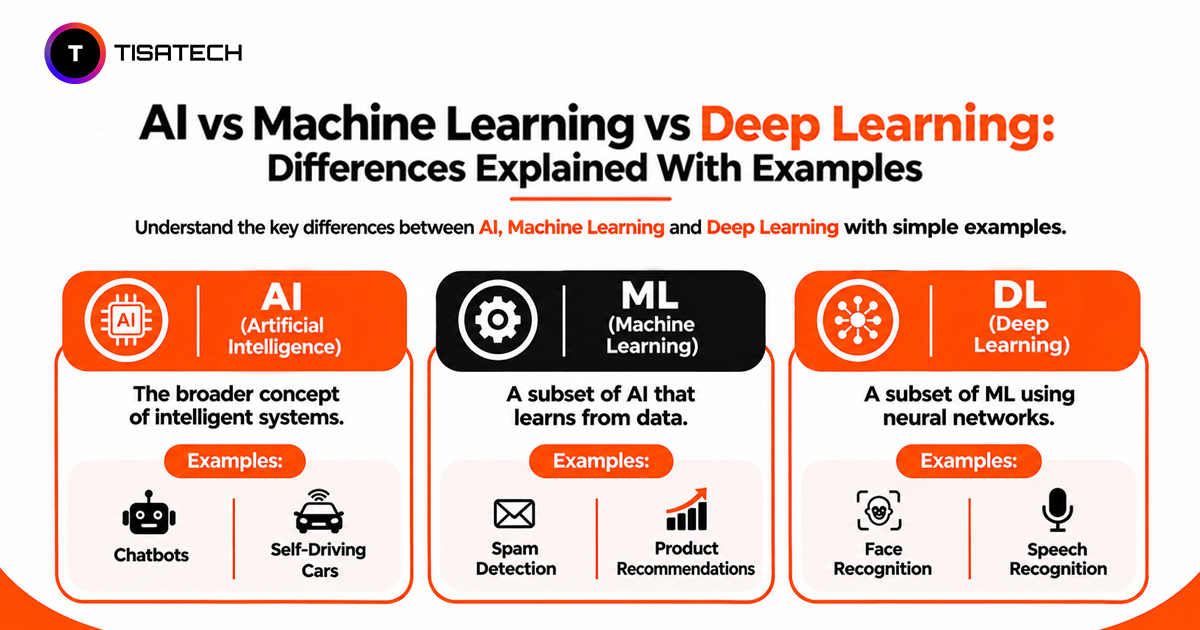
Artificial intelligence (AI), machine learning (ML), deep learning (DL) and generative AI are closely related, but they do not mean the same thing. The easiest way to understand them is to look at what each one does.
Artificial Intelligence (AI) is the broad field of building systems that perform tasks usually associated with human intelligence, such as recognising images, understanding language, making predictions and solving problems. It includes both rule-based programs and systems that learn from data.
Machine Learning (ML) is a branch of AI that allows computers to learn patterns from data and use them to make predictions or decisions. Instead of writing a separate rule for every situation, developers train a model using examples. For instance, a bank can use machine learning to estimate loan risk by analysing factors such as income, repayment history and existing debt.
For example, a student marks prediction model can use information such as study hours, attendance and previous test scores to estimate marks in an upcoming exam. Developers train the model using data from past students and their actual exam marks. After training, the model can use a new student’s information to predict their possible score. The prediction may not be exact, but it shows how machine learning uses past data to make predictions about new situations.
Deep Learning (DL) is a specialised type of machine learning that uses artificial neural networks with multiple layers. These networks learn complex patterns from large amounts of data, which makes them useful for tasks such as recognising faces, processing speech and analysing medical images. Their design takes inspiration from the human brain, but they do not work exactly like it.
A neural network typically contains three main types of layers: input, hidden and output layers. The input layer receives information, such as the pixels of an image. Hidden layers process that information and identify patterns, such as edges, shapes and facial features. The output layer uses the patterns identified by the network to produce a result, such as predicting whether an image contains a cat or a dog.
For example, when a deep learning model analyses a cat’s photograph, the input layer receives image data, the hidden layers identify visual features such as ears, eyes and body shapes, and the output layer predicts the most likely category. Networks with multiple hidden layers can learn increasingly complex patterns, which makes deep learning useful for image recognition, speech processing and other complex tasks.
Generative AI refers to AI systems that create new content, including text, images, audio, video and code. Many modern generative AI tools use deep learning models trained on large datasets. For example, a chatbot generates a response based on your prompt and patterns learned during training. Large language models usually generate text one token at a time, while image-generation models use different techniques to create pictures.
To understand how an LLM generates text, think of a simple prompt: “Explain AI in simple words.” The model first processes the prompt and breaks the text into smaller units called tokens. A token can be a complete word, part of a word or even a punctuation mark. It then predicts which token is most likely to come next based on the context and patterns learned during training.
For example, after receiving the prompt, the model may generate “Artificial”, then “intelligence”, followed by “helps”, “machines” and other words to complete the explanation. It continues adding one token at a time until the response is complete. In simple words, a language model predicts the next token using the prompt and the text it has already generated. Some AI tools also collect information from external sources before answering. The words generated may differ depending on the prompt and the model’s settings.
The relationship is easier to remember this way: machine learning is part of AI, and deep learning is part of machine learning. Generative AI is another area within AI that commonly uses deep learning, but it is not simply another layer in the same hierarchy.
| Technology | What It Means | Main Purpose | Example |
|---|---|---|---|
| Artificial Intelligence (AI) | Technology that enables machines to perform tasks requiring human-like intelligence. | Solving problems, recognising patterns and supporting decisions. | Voice assistants and spam filters |
| Machine Learning (ML) | A branch of AI that learns patterns from data. | Making predictions and decisions using data. | Email spam detection |
| Deep Learning (DL) | A type of ML that uses multi-layered neural networks. | Handling complex patterns in images, speech and text. | Face recognition and speech recognition |
| Generative AI | AI that creates new content based on learned patterns. | Generating text, images, audio, video and code. | ChatGPT and image-generation tools |
For example, a traditional machine learning model might predict next month’s sales, while a generative AI tool can draft a sales report using business data. Both use AI, but they perform different tasks.
Understanding these differences makes it easier to follow AI courses, technical discussions and industry updates. You can also read Generative AI vs Traditional AI to understand how content-generating systems differ from AI built for tasks such as classification and prediction.
What Are the Types of AI?
Artificial intelligence is commonly classified in two ways: by its capabilities (what it can do) and by its functionality (how it works). These classifications help explain the difference between the AI systems people use today and those researchers may develop in the future.
Types of AI Based on Capabilities
This classification includes three types:
1. Narrow AI (Artificial Narrow Intelligence)
Narrow AI is designed to do specific tasks. It cannot handle every type of problem. It is used in tools such as voice assistants, spam filters, recommendation systems, translation apps and chatbots. For example, a chess-playing AI can beat expert players, but it cannot do other tasks, such as booking a train ticket. Almost all AI tools used today are examples of Narrow AI.
2. General AI (Artificial General Intelligence)
General AI would be able to perform many different tasks just like a human. It could use what it learns from one task to handle another and learn new skills without needing separate training for each task. However, researchers have not yet developed an AI system that can do all this.
3. Super AI (Artificial Superintelligence)
Super AI would go beyond human intelligence across areas such as reasoning, creativity and problem-solving. It remains a theoretical concept, with no existing system demonstrating these capabilities.
Types of AI Based on Functionality
This classification describes how AI systems use information and respond to their surroundings.
1. Reactive Machines
Reactive machines respond to current inputs without storing memories of past interactions. IBM’s Deep Blue chess computer is a classic example. It analysed the current chessboard and selected moves without using memories of previous games to guide its decisions.
2. Limited Memory AI
Limited memory AI uses past information along with current inputs to make decisions. Self-driving systems, for example, analyse previous observations and real-time information about nearby vehicles, roads and obstacles to navigate safely. Many modern AI applications use some form of limited-memory capability.
3. Theory of Mind AI
Theory of Mind AI would recognise and understand human emotions, beliefs and intentions. It could use this understanding to respond according to a person’s feelings or situation. However, current AI systems cannot genuinely understand human mental states in this way.
4. Self-Aware AI
Self-aware AI would understand that it exists and be aware of its own thoughts and experiences. This type of AI is still only an idea, and researchers have not developed a system that can do this.
For beginners, the main difference is simple: Narrow AI and limited-memory AI describe many of the AI systems used today. General AI, Super AI, Theory of Mind and Self-Aware AI describe abilities that AI has not achieved yet. These are two different ways of classifying AI, not seven steps that AI must follow.
Which AI Tools Should Beginners Start With?
Beginners can start learning AI by experimenting with a few accessible tools before moving towards programming and model development. The right tools depend on whether someone wants to use AI for everyday tasks or build AI applications.
AI Tools for Everyday Use
Several AI assistants help beginners understand topics, write content and find information. Each tool offers different features for everyday learning and productivity.
ChatGPT: Useful for learning new concepts, brainstorming ideas, writing content and solving everyday problems. Beginners can use it to understand difficult topics through simple explanations and examples.
Try this: Ask ChatGPT to explain photosynthesis in simple English for a Class 10 student, then request five multiple-choice questions to test your understanding.
Google Gemini: Helps with research, text and image-based tasks, and integrates with Google’s ecosystem. It is useful when working across different types of content.
Try this: Upload a picture of handwritten study notes (without personal information) and ask Gemini to summarise the key points or explain difficult terms.
Claude: Useful for understanding lengthy material, analysing long documents and getting coding assistance. It can help beginners summarise detailed study materials.
Try this: Paste a chapter from your study material and ask Claude to create a summary with key definitions, important points and five revision questions.
Microsoft Copilot: Helps with everyday questions, content creation and tasks within Microsoft’s ecosystem. It is particularly useful for improving productivity when working with Microsoft tools.
Perplexity: Useful for web research because it provides source links alongside its answers. Beginners can use these links to verify facts and find additional reading material.
Try this: Search for “How does machine learning work?” and review the linked sources to compare explanations and identify reliable learning resources.
Tools for Learning and Building AI
Students who want to develop AI applications should start with Python, a widely used programming language in AI development. Its readable syntax makes it a practical starting point for beginners.
As programming skills improve, students can explore different Python libraries:
- Pandas: Helps organise, clean and analyse datasets.
- Scikit-learn: Provides tools for building and evaluating traditional machine learning models.
- TensorFlow: Helps developers build and train deep learning models.
- PyTorch: Provides tools for developing neural networks and other deep learning applications.
Beginners do not need all these libraries immediately. Learning Python fundamentals and working with simple datasets provides a better starting point before moving towards machine learning and deep learning.
How Should Beginners Practise with AI Tools?
Start with a simple task and give the AI tool enough context to understand what you need. For example, instead of asking it to explain AI, try: “Explain artificial intelligence in five short paragraphs for a Class 12 student, using simple English and one daily-life example.”
A clear prompt usually includes three things: the task, relevant context and the expected format. Review the response, verify important facts and ask follow-up questions when something is unclear.
Remember that AI tools can produce incorrect information even when their answers sound convincing. Avoid sharing sensitive information such as passwords, bank details or Aadhaar numbers. Use AI as a learning assistant, not as a replacement for your own understanding.
What Common AI Myths Should Beginners Understand?
Several misconceptions make AI harder to understand than it really is. Clearing them up helps beginners set realistic expectations and use AI more confidently.
1. AI Thinks Like a Human
AI can produce human-like responses, but that does not mean it thinks or feels like a person. It processes information and identifies patterns to generate outputs. A chatbot may respond with empathy, for example, but it does not experience emotions.
2. AI Is Always Correct
AI can make mistakes, misunderstand questions or present false information as fact. Generative AI models can also produce hallucinations-responses that sound convincing but contain inaccurate or invented details. Always verify important information, especially when using AI for study, research or work.
3. You Need Coding Skills to Learn AI
You can use AI tools without writing code. Building AI applications requires programming knowledge, but beginners do not need to master everything at once. Start by using AI tools, then learn Python and basic machine learning concepts as your skills develop.
4. AI Will Replace Every Job
AI can automate specific tasks, but that does not mean it will replace every profession. Many roles will change as people use AI to handle repetitive work, analyse information and improve productivity. Understanding how to work with AI can help people adapt to these changes.
5. AI and Robots Are the Same Thing
AI is a technology that processes information and performs tasks, while a robot is a physical machine that interacts with the world. Some robots use AI to recognise objects or make decisions, but most AI applications work entirely through software, such as chatbots, recommendation systems and voice assistants.
6. AI Is a New Invention
AI research began in the 1950s, although the technology has advanced significantly since then. Recent progress in computing power, data and machine learning has made AI tools more capable and accessible to everyday users.
What Are the Limits and Risks of AI?
AI can make everyday tasks easier, but it can also produce unfair results, expose private information and spread misleading content. Beginners should understand these risks before relying on AI tools.
1. Bias in AI Results
AI models learn from data created by people. If this data contains unfair patterns, AI may also make unfair decisions. For example, an AI hiring system trained on biased data may favour some groups over others. Always check AI decisions that can affect people’s opportunities.
2. Privacy and Data Security
Some AI tools collect or process the information users enter. Sharing personal details, passwords, financial records or confidential documents can create privacy risks. Check a tool’s privacy settings and data policies before using it, and share only the information necessary for the task.
3. Incorrect or Misleading Information
AI can generate false facts, invented quotes and unreliable sources while presenting them confidently. This can mislead students, researchers and professionals. Verify important claims using reliable sources instead of copying AI-generated answers without checking them.
4. Overdependence on AI
Using AI for every assignment or problem can reduce opportunities to practise writing, research and problem-solving. Students should try solving a task themselves before asking AI for help. Use its suggestions to understand difficult topics, not to replace your own learning.
5. Misuse of AI
People can use AI to create fake images, clone voices and write convincing scam messages. For example, a scammer may imitate a relative’s voice and ask for urgent money. Verify unexpected requests through a separate, trusted contact method before sharing information or making payments.
The safest approach is to treat AI as an assistant, not an authority. Check its answers, protect personal information and keep developing skills that require human judgment.
How to Start Learning Artificial Intelligence for Beginners?
For anyone wondering how to learn AI from scratch, the best approach depends on what they want to achieve. If you want to use AI tools, start with everyday tasks and understand basic concepts. If you want to build AI applications, begin with programming and practical projects. Both paths provide a useful starting point for AI beginners.
Start by Using AI Tools
Choose one AI assistant and use it for simple tasks such as summarising an article, explaining a difficult topic, drafting an email or planning a study schedule. Try different prompts, compare the responses and check where the tool makes mistakes. This helps you understand both its capabilities and limitations.
Learn Python and Basic Concepts
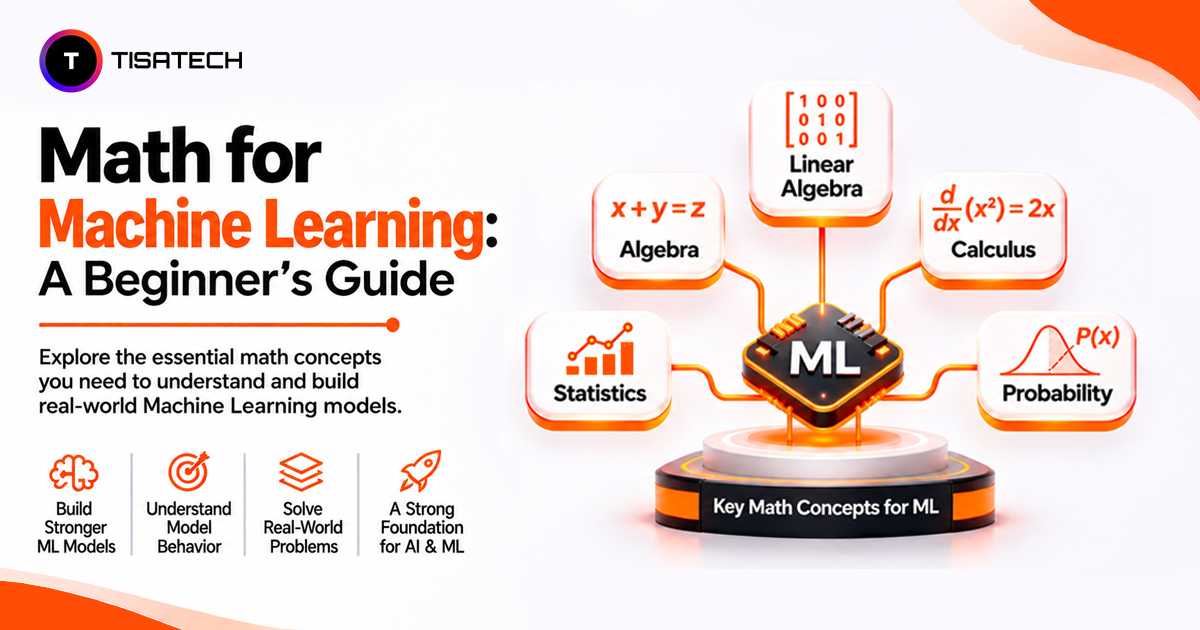
If you want to build AI applications, start with Python. Learn variables, loops, functions, lists and dictionaries before moving to libraries such as Pandas and Scikit-learn. Basic algebra, probability and statistics will also help you understand how machine learning models work.
You can begin with the official Python tutorial and then follow the Scikit-learn getting started guide to explore machine learning.
Build Small Projects
Apply what you learn through beginner projects such as a spam detector, a marks prediction model or a simple chatbot. Start with small datasets and focus on understanding how your program works. Building and improving a few projects teaches more than simply watching tutorials without practising.
Beginner Project: Build a Student Marks Prediction Model
A student marks prediction model is a simple beginner project that demonstrates how machine learning uses historical data to make predictions. The goal is to estimate a student’s possible exam score based on factors such as study hours, attendance and previous test performance.
How the project works:
- Collect data: Create a small dataset with students’ study hours, attendance, previous test scores and final exam marks.
- Prepare the data: Use Python and Pandas to organise the data and find any missing or incorrect values.
- Train a model: Use Scikit-learn and a simple linear regression algorithm to learn how study hours, attendance and previous scores relate to exam marks.
- Test the model: Check how well the model predicts marks using student records it has not seen during training.
- Make predictions: Enter details for a new student and let the model estimate their possible exam marks.
Example dataset:
| Study Hours per Day | Attendance | Previous Test Score | Final Exam Marks |
|---|---|---|---|
| 2 | 65% | 48 | 52 |
| 3 | 72% | 55 | 60 |
| 4 | 80% | 65 | 68 |
| 5 | 88% | 74 | 78 |
| 6 | 92% | 82 | 86 |
These sample records help beginners understand how input features relate to a prediction target. A real project would need a larger and more representative dataset to produce meaningful predictions.
What beginners learn: This project introduces data preparation, input features, target variables, model training, testing and prediction. It also shows why machine learning predictions are estimates rather than guaranteed results.
Practise Regularly and Ask Questions
Combine short lessons with hands-on exercises. Write notes in your own words and try explaining concepts without looking at your notes. If you get stuck, use documentation, learning communities or a mentor to understand the problem instead of just copying the solution.
Consistent practice matters more than long, irregular study sessions. Even 30 minutes a day can help you build a strong foundation over time.
A 12-Week Beginner Roadmap to Learn AI
A structured learning plan helps beginners understand AI concepts without trying to learn everything at once. The following 12-week roadmap covers the basics, programming, mathematics, machine learning and practical projects.
| Timeline | What to Learn | Practical Activity |
|---|---|---|
| Weeks 1-2 | AI Fundamentals: Understand artificial intelligence, machine learning, deep learning, generative AI and everyday AI applications. | Experiment with ChatGPT or Gemini and identify AI applications used in daily life. |
| Weeks 3-4 | Python Programming: Learn variables, data types, conditional statements, loops, functions, lists and dictionaries. | Write small Python programs, such as a calculator or number-guessing game. |
| Week 5 | Basic Mathematics: Understand percentages, algebra, averages, probability and basic statistics. | Calculate averages, identify patterns in simple datasets and practise basic probability problems. |
| Week 6 | Data Handling: Learn how to work with datasets using Python and Pandas. Understand data cleaning, filtering and basic analysis. | Load a small dataset, clean missing values and calculate simple statistics. |
| Weeks 7-8 | Machine Learning: Understand supervised and unsupervised learning, model training, testing and evaluation. Explore Scikit-learn. | Build a simple classification or prediction model using a beginner-friendly dataset. |
| Weeks 9-10 | Deep Learning and Generative AI: Learn the basics of neural networks, large language models and generative AI applications. | Experiment with a simple chatbot or explore how an AI model generates responses. |
| Weeks 11-12 | Practical Projects: Apply the concepts you have learned by building and testing a small AI application. | Develop a spam classifier, student marks prediction model or basic chatbot and document how it works. |
Beginners should focus on understanding each concept rather than completing every topic quickly. Spending around 30-60 minutes a day on lessons and practical exercises can help build a foundation over these 12 weeks. The timeline is flexible, so learners can spend additional time on Python or mathematics if needed.
| Follow Us for Daily Tech Tips |



|
Where Can Beginners Learn AI in Jaipur?
Beginners often need more than online videos to learn artificial intelligence. A structured course, practical exercises and guided projects can help them understand AI concepts and see how they are used in real life. If you are looking for AI training in Jaipur, compare the course topics, programming skills taught and practical projects before choosing a programme.
TISA-TECH, an IT training institute in Jhotwara, Jaipur, offers AI and machine learning courses for students who want to learn these skills. Beginners can start with Python basics and gradually move on to machine learning concepts and practical AI applications.
Students who want to build applications that generate text and other content can learn Generative AI. Those interested in learning how computers find patterns in data and make predictions can explore machine learning concepts. The Python programming basics can also help beginners develop the coding skills needed for AI development.
Before joining a course, check its syllabus, duration, practical exercises and projects. Choose a programme that matches your current knowledge and learning goals. This can help you move from learning basic concepts to building AI applications.
Conclusion
Understanding the main AI concepts makes it easier to learn how artificial intelligence works. AI is the broader field, machine learning helps computers learn from data, deep learning uses neural networks to solve complex problems, and Generative AI creates content such as text, images and code. Most AI systems today are designed for specific tasks.
To get started, try tools such as ChatGPT or Gemini and practise writing clear prompts. If you want to build AI applications, learn Python, basic maths and data handling before moving to machine learning.
Remember that AI can give incorrect answers, show bias and create privacy risks. Always check important information. You do not need to learn everything at once. Start with one topic, build a small project and expand your knowledge as you gain experience.
FAQs Section
Ans. Yes. Students from science, commerce and arts backgrounds can learn AI. Basic computer skills, logical thinking and regular practice provide a good starting point.
Ans. Python is a good starting point because its syntax is beginner-friendly and it has libraries such as Pandas and Scikit-learn for data analysis and machine learning.
Ans. Basic mathematics is enough to get started. Algebra, percentages, probability and statistics become useful when studying machine learning algorithms in more detail.
Ans. Yes. Beginners can start by understanding basic AI concepts, then learn Python programming, basic mathematics and data handling. After that, they can study machine learning, build small projects and gradually explore deep learning and generative AI.
Ans. Beginners can build a spam message classifier, a student marks prediction model or a simple chatbot. These projects help students practise programming, work with data and understand how AI applications function.
Ans. Yes. Free tutorials, documentation and practice platforms provide a good way to start. However, building projects and solving problems regularly are important for developing practical skills.