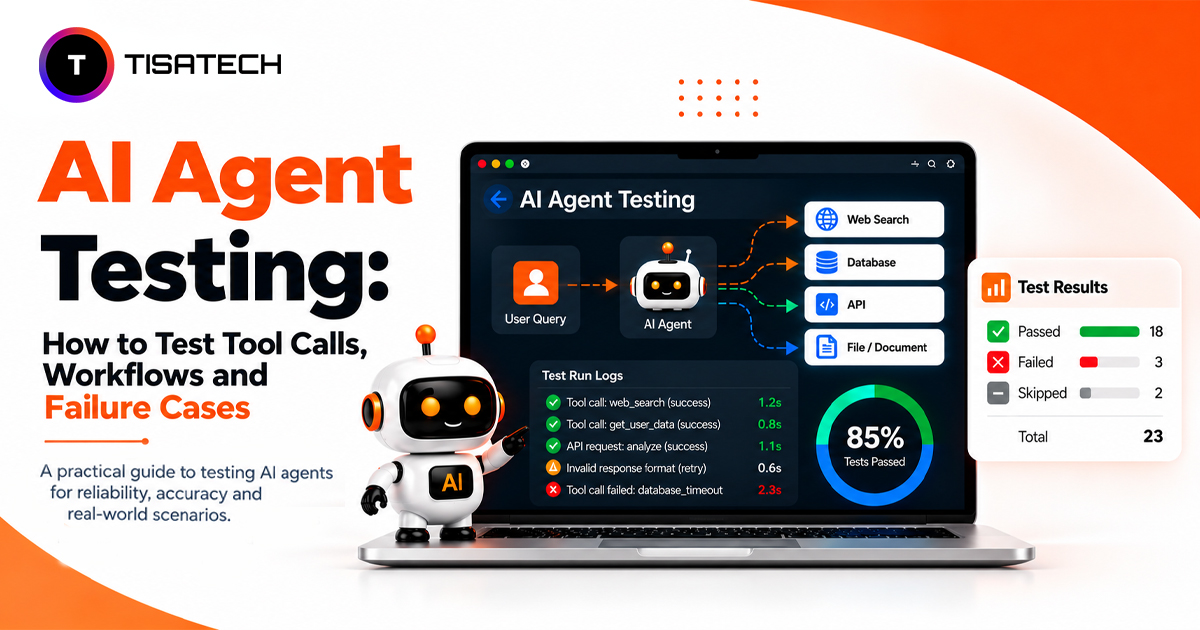
You build an AI agent that answers questions and calls a weather API. It works until an API times out or the agent sends incorrect inputs. Worse, it reports success even though the task is never finished.
This is why AI agent testing goes beyond checking final answers. You need to verify tool selection, input accuracy, execution steps, and actual results. Anthropic’s guide to agent evaluations explains why testing an agent’s actions and decision-making matters as much as evaluating its responses.
This guide explains how to test individual tool calls, complete workflows, and failure cases using practical methods and Python examples.

Why do AI agents fail even when the answer looks right?
An AI agent can give a convincing answer while making the wrong tool call, sending incorrect inputs, or failing to complete an action. For example, a refund agent might confirm a refund without actually creating one.
This happens because an agent makes several decisions during execution: which tool to use, what data to send, how to handle the response, and what action to take next. Testing only the final answer misses these failures. You must also inspect tool calls, execution traces, and the actual system state.
As agents take on more business tasks, these failures become harder to ignore. Gartner predicts that 40% of enterprise applications will include task-specific AI agents by the end of 2026, compared with less than 5% in 2025. This makes reliable testing essential before agents handle customer requests, payments, or business data.
How do you test an AI agent step by step?
A reliable testing process starts with clear success criteria and ends with repeated checks after every change. Follow these seven steps:
1. Define expected results and safety limits.
Write down what the agent must complete and what it must never do. Apply AI agent security best practices by defining tool permissions, approval requirements, and restricted actions. For a refund agent, success means finding the correct order, checking refund eligibility, and processing the approved refund. Refunding the wrong order must always count as a failure.
2. Build a test dataset.
Start with 10 to 20 test cases covering normal requests, missing information, invalid inputs, and unexpected responses. Add every new failure to this dataset so you can check it again after future updates.
3. Test individual tools.
Check each tool before connecting it to the agent. Verify input formats, required fields, API responses, and error handling.
4. Use mock tools during testing.
Replace live APIs with mock tools that return controlled responses, such as successful results, timeouts, empty data, and errors. Mock responses allow safe testing without sending real emails or processing actual payments.
5. Inspect execution traces.
Review selected tools, arguments, responses, and execution steps against the expected workflow.
6. Repeat tests and measure consistency.
Repeat tests to measure consistency and track the agent’s pass rate. Anthropic’s guide to agent evaluations explains why repeated trials help measure agent reliability.
7. Run regression tests after every change.
Rerun the full dataset after changing prompts, tools, or agent logic to catch regressions. You can also use LangSmith’s evaluation tools to organize test datasets and compare agent performance across versions.
How do you test tool calls in an AI agent?
Test tool selection, input accuracy, and execution order to ensure the agent follows the expected process.
AI Agent Tool-Call Testing Workflow
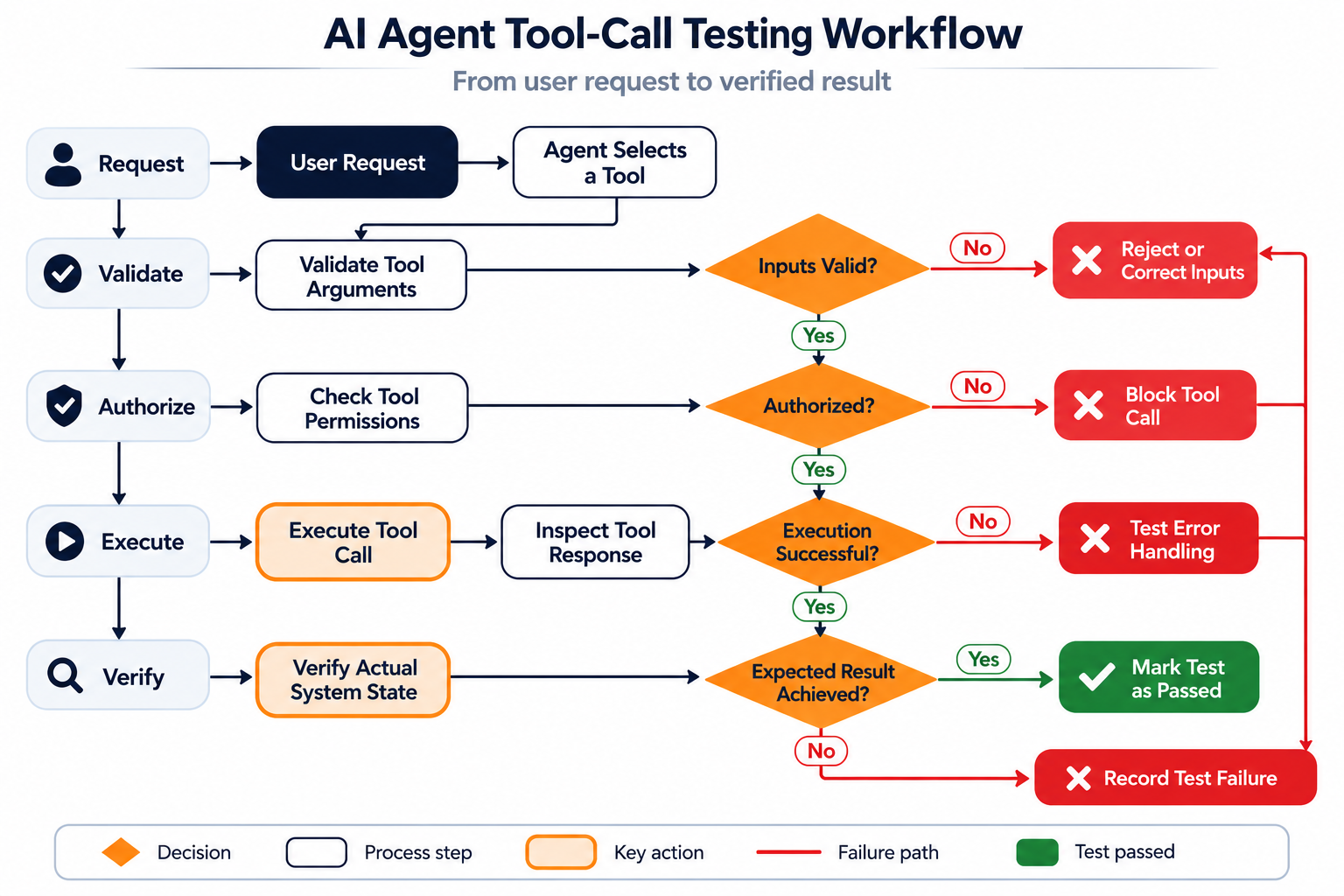
This workflow checks every stage of a tool call, from tool selection and input validation to execution and result verification. If any stage fails, record the issue and add it to the regression test dataset. A test passes only when the tool executes correctly and the expected result is confirmed in the connected system.
1. Check tool selection.
Give the agent different requests and verify that it selects the correct tool or answers directly when no tool is needed.
2. Validate tool inputs.
Inspect the arguments the agent sends with each call. Check required fields, date formats, units, and IDs. For example, a refund agent must use the order ID provided by the user or retrieved from the order system, not invent one. Also verify that the inputs meet the tool’s schema requirements.
3. Verify execution order.
Some tasks require tools to run in a specific sequence. A booking agent must check availability before creating a reservation. Compare the actual tool-call sequence with the expected sequence across different user requests to catch skipped or misplaced steps.
4. Confirm the actual result.
Never rely only on the agent’s final message. Check the database or connected system to confirm that the action happened. If the agent says a ticket is booked, verify that a booking record exists and contains the correct details.
LangSmith’s evaluation guide explains how to compare an agent’s actual tool-call sequence with the expected execution path using code or an LLM judge.
What happens when an AI agent tool call fails?
An AI agent must handle tool failures without losing track of the task or reporting false success. An API timeout, empty search result, invalid response, or server error can interrupt execution. The agent should retry temporary failures within a set limit, explain permanent failures, or ask a human to take over when necessary.
A timeout occurs when the API does not respond within the allowed time. An empty response means the search tool returns no matching records. A server error occurs when the API returns a 500 status code. An invalid response contains incomplete or incorrectly formatted data.
Run the agent against each scenario and check three things: Does it retry only when appropriate? Does it stop after the retry limit? Does it report the actual outcome instead of claiming success?
Also test what happens when a tool fails after completing an action. For example, if a refund succeeds but the confirmation response times out, the agent must check the refund status before trying again. Otherwise, it could process the same refund twice. Use idempotency keys (unique IDs that prevent the same action from running twice) or duplicate-action checks to avoid this.
OpenAI’s guide to production best practices provides useful guidance on building reliable API-based applications.
Add these failure scenarios to your regular test suite and rerun them after changes to prompts, tools, or agent logic.
How do you test AI agent workflows?
Individual tool calls can pass while the complete workflow fails. For example, a refund agent may find the correct order but fail to update its refund status. Workflow testing checks whether all steps produce the expected result.
A practical approach uses three levels:
1. Unit and safety checks
Test functions, inputs, permissions, and safety rules. For example, verify that the agent cannot delete records without user confirmation.
2. Workflow and execution path checks
Compare the actual execution path with the expected refund workflow:
- Look up the order.
- Check refund eligibility.
- Request approval if required.
- Process the refund.
- Verify the updated status.
Use code-based checks for fixed sequences and an LLM judge for workflows with multiple valid paths. Compare sample judgments with human evaluations.
3. Production monitoring
Review real agent runs for incomplete tasks, failed tool calls, unexpected retries, and incorrect actions. LangSmith evaluations support both offline testing and online evaluation of production runs.
Use OpenTelemetry tracing to track how a request moves through different tools and services. This is an important part of AI agent observability, helping you pinpoint which step caused the workflow to fail.
What does a simple agent test look like in code?
A simple Python test can check whether an agent handles a failed tool call honestly. In this example, a mock refund API simulates a timeout:
class FakeTools:
    def __init__(self, refund_api="success"):
        self.refund_api = refund_api
        self.refunds_created = 0
        self.tools_called = []

    def lookup_order(self, order_id):
        self.tools_called.append("lookup_order")
        return {"order_id": order_id, "eligible": True}

    def refund_order(self, order_id):
        self.tools_called.append("refund_order")

        if self.refund_api == "timeout":
            raise TimeoutError("Refund API timed out")

        self.refunds_created += 1
        return {"status": "refunded"}


class AgentResult:
    def __init__(self, tools_called, final_text):
        self.tools_called = tools_called
        self.final_text = final_text


def run_agent(request, tools):
    order_id = request.split()[-1]

    try:
        order = tools.lookup_order(order_id)

        if not order["eligible"]:
            return AgentResult(
                tools.tools_called,
                "The order is not eligible for a refund."
            )

        refund = tools.refund_order(order_id)

        return AgentResult(
            tools.tools_called,
            f"Refund {refund['status']} successfully."
        )

    except TimeoutError:
        return AgentResult(
            tools.tools_called,
            "The refund could not be completed because the API timed out."
        )


def test_refund_timeout_is_reported():
    tools = FakeTools(refund_api="timeout")
    result = run_agent("Refund order 1042", tools)

    assert result.tools_called == [
        "lookup_order", "refund_order"
    ]
    assert tools.refunds_created == 0
    assert "could not be completed" in result.final_text.lower()
    assert "refunded successfully" not in result.final_text.lower()
This example simulates a refund API timeout using mock tools. The test checks whether the agent looks up the order, handles the failed refund request, and reports the error without claiming success.
FakeTools, AgentResult, and run_agent() provide the mock tools and simplified agent logic needed to execute this test.
Install pytest using:
pip install pytestRun the test using:
pytest -vYou can use the same approach to test invalid inputs, API errors, and unexpected tool responses. The pytest mocking guide explains how to replace real dependencies during tests.
Which testing mistakes should students avoid?
Avoid these five common mistakes when testing agent-based applications:
1. Checking only the final answer. Check execution traces and confirm that the requested action actually occurred.
2. Trusting a single test run. Agent behavior can vary between runs. Repeat important tests to catch inconsistent results and unexpected actions.
3. Testing with live tools. A test can accidentally send emails, change records, or trigger payments. Use mock tools or sandbox environments to test safely.
4. Ignoring unexpected inputs. Test vague requests, repeated tool calls, malformed data, and prompt injection attacks hidden in user messages or external content. Follow the OWASP prompt injection guidance and set execution limits to prevent endless loops or unauthorized actions.
5. Stopping tests after launch. Add every new failure to your regression test dataset. Once your tests cover the main failure cases, follow this guide to deploy AI agents in production.
| Follow Us for Daily Tech Tips |



|
How can TISA-TECH help you learn this?
TISA-TECH connects AI concepts with practical development through its Python, AI & ML, and Generative AI training programs. Students can apply these skills by building a Python-based customer support agent that looks up orders, checks refund eligibility, and handles failed API calls.
Students can write tests for valid and invalid inputs, mock API failures, verify tool-call sequences, and connect the agent to APIs using FastAPI. Students gain practical experience with Python, API integration, and agent evaluation, along with a project they can document on GitHub to demonstrate their development and debugging skills.
Students can build these foundations through TISA-TECH’s Python programming course, AI & ML course.
Conclusion
Testing agents helps you check whether an agent works as expected, uses the right tools, and handles errors correctly. Checking only its final answer is not enough. You also need to verify that each action is completed successfully.
Start with a few test cases and use fake tools to test errors safely. Whenever you find a new issue, add a test for it. Run your tests again after every major change to catch problems before they reach users.
FAQs Section
Ans. Python is useful because many AI agents use it for tool integration, API calls, and automated agent checks. Basic knowledge of functions, conditions, and API requests is a good starting point.
Ans. You can start with Python’s pytest for writing tests. Tools like LangSmith help evaluate agent responses, tool calls, and execution paths.
Ans. Yes. Start with a simple existing agent and test its tool inputs, outputs, and error handling. Once you understand the process, create your own agent and write tests to check its behavior.
Ans. Build a customer support agent that looks up orders and checks refund requests. Test valid and invalid order IDs, API failures, and cases where the agent must ask for approval before processing a refund.
Ans. Upload your project to GitHub with its source code, test cases, sample execution results, and a short README explaining what you tested and which issues you fixed. This helps others understand your testing process.