You find a bug, check the code several times, and still cannot see what is wrong. You paste the error into ChatGPT, get a fix in seconds, and then find that the fix solves one problem but creates another. That is the part of AI-assisted debugging many developers still have to deal with.
AI tools have become a regular part of software development. According to the 2025 Stack Overflow AI Survey, 84% of developers use or plan to use AI tools in their development process. Yet 66% said AI solutions are often almost right but still need changes, while 45% said debugging AI-generated code takes more time.
The prompt also affects the kind of answer you get. If you ask, “Why is this code not working?”, the AI has very little context. If you include the relevant code, exact error, expected result, and what you already tried, you give it much more to work with. OpenAI’s Prompt Engineering Best Practices recommends using clear, specific instructions and providing enough context when prompting ChatGPT.
This guide covers practical AI prompts for debugging code. You will learn how to understand errors, find their causes, fix code, and check the results before moving forward.

How Can ChatGPT Actually Help You Debug Code?
ChatGPT can explain error messages and stack traces in simple language. Paste the error and the relevant code, then ask what caused the problem and where you should look.
It can also help you find logical bugs that do not produce an error. For example, a loop may run one extra time, or a condition may check the wrong variable. ChatGPT can review the logic and point out where the problem may be.
You can also ask ChatGPT where to add print statements or logs to track what the program does at each step. If you can reproduce the bug, it can help you create a small test case to isolate the issue.
Keep one thing in mind, ChatGPT sees only the information you share. It cannot automatically access your complete codebase, live database, server setup, or development environment. Share the relevant code, exact error, expected result, and what you have already tried to get a more useful answer.
What is the Best ChatGPT Prompt for Debugging Code?
A good debugging prompt should include three important details: the exact error or unexpected behavior, the relevant code, and what the code should do. These details help ChatGPT understand the difference between the actual result and the expected result.
Avoid pasting an entire project or a long file into ChatGPT. Unrelated code can make it harder to find the real problem. Instead, share the function that causes the issue, the input that triggers it, and the exact error message. This gives ChatGPT the information it needs to review your code.
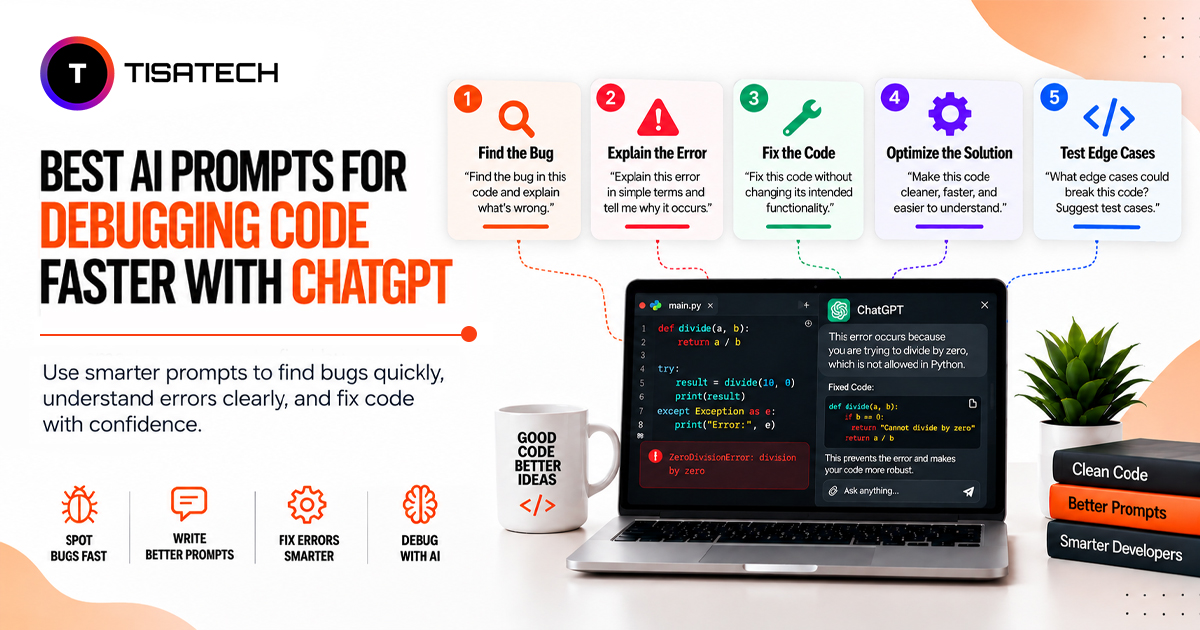
You can use different prompt types for different debugging problems. Each prompt focuses on a specific part of the issue.
1. Root Cause First
Ask ChatGPT to find out why the error happens before it suggests a solution.
Example: “Explain the main cause of this error before suggesting a fix.”
This helps you understand the problem instead of applying a quick fix without knowing the reason.
2. Step-by-Step Isolation
Use this prompt when you know which function causes the problem but cannot find the exact line.
Example: “Review this function step by step. Identify where the code starts producing the wrong output and suggest where I should add log statements.”
This approach helps you narrow down the problem and identify where the code starts behaving incorrectly.
3. Hidden Bug Check
Some bugs do not show an error message but still affect your application. Ask ChatGPT to review your code for logical mistakes, memory leaks, and unhandled exceptions.
Example: “Review this code and identify any logical errors or exceptions that the code may not handle properly.”
4. Edge Case Check
Your code may work with normal inputs but fail with empty values, negative numbers, or unexpected data. Ask ChatGPT to check these situations before you release your application.
Example: “Check this function for edge cases and explain how it should handle empty, invalid, or unexpected inputs.”
5. Minimal Reproduction
When a bug appears inside a large project, ask ChatGPT to create a smaller example that shows the same problem.
Example: “Create a minimal example that reproduces this error using Python and explain why the error occurs.”
A smaller example makes it easier to understand, test, and fix the problem.
5 Common Bugs Every Developer Faces and the Exact Prompt to Fix Them
Developers often face the same coding problems while working on different projects. ChatGPT can help you understand these errors and find possible solutions when you provide the right details.
Here are five common bugs, along with ready-to-use prompts for debugging them with ChatGPT.
1. Syntax Error
A syntax error occurs when your code breaks the rules of a programming language. A missing bracket, semicolon, or incorrect keyword can stop the code from running.
Prompt to use: “Here is my code and the exact syntax error I received: [paste error and code]. Identify the line causing the error, explain why it is incorrect, and show me the corrected code.”
2. Undefined or Null Reference Error
This error occurs when your code tries to use a variable or object that has not received a value or contains null. For example, your code may try to access a property of an object that does not exist.
Prompt to use: “This code gives me a null or undefined error: [paste code and error]. Identify the variable or object causing the problem, explain why it has no usable value, and show me how to fix it.”
3. Infinite Loop
An infinite loop keeps running because the code never reaches its exit condition. This can cause the program to freeze or use unnecessary system resources.
Prompt to use: “This loop keeps running and never stops: [paste code]. Check the loop condition and update statement. Explain why the loop does not end and suggest the smallest change that will make it stop correctly.”
4. Off-by-One Error
An off-by-one error occurs when a loop or array index processes one item too many or too few. This can produce incorrect results or an index-out-of-range error.
Prompt to use: “I think this code has an off-by-one error: [paste code]. Check the starting and ending conditions, identify where the count goes wrong, and show me the corrected code.”
5. Type Mismatch Error
A type mismatch occurs when the code receives a data type that does not match what an operation expects. For example, the code may try to perform a mathematical calculation using text instead of a number.
Prompt to use: “This code is giving me a type error: [paste error and code]. Identify the variable with the incorrect data type, explain why it has that type, and show me how to convert or validate the value correctly.”
Keep these prompts ready whenever you face a common coding issue. They can help you explain the problem to ChatGPT more clearly and save time while debugging. Still, test every suggested fix in your own code before using it in a real application.
How Do You Use ChatGPT to Fix Coding Errors, Step by Step?
Follow these steps to help ChatGPT understand your coding problem and suggest a more relevant solution.
Step 1: Share the Exact Error Message
Copy the complete error message and stack trace instead of explaining them in your own words. The original details help ChatGPT identify where the problem occurs.
Step 2: Add the Relevant Code
Share only the function or code section related to the error. You do not need to paste your entire project. Focus on the part where the problem occurs.
Step 3: Explain the Expected and Actual Results
Tell ChatGPT what your code should do and what it does instead. For example, mention if you expect a number but receive null, or if a function returns the wrong result.
Step 4: Ask for the Root Cause
Ask ChatGPT to explain why the error occurs before requesting a fix. This helps you understand the problem instead of applying a solution without knowing how it works.
Step 5: Test the Suggested Fix
Apply the change in a small test or controlled part of your code first. Check whether it solves the original problem and does not create new errors before using it across your application.
These steps help you explain coding problems clearly and make ChatGPT’s debugging suggestions easier to review. Always check the result in your own development environment before relying on the fix.





Why Should Developers in Jaipur Learn These Skills at TISA-TECH?
Learning to code involves more than understanding programming concepts. Students also need to identify errors, follow debugging steps, and use tools like ChatGPT effectively. TISA-TECH helps students build these skills through practical, classroom-based training.
During project work, students practise coding and debugging while learning to explain errors, write clear prompts, review ChatGPT’s suggestions, and test code changes. Through Generative AI Training in Jaipur, they can also learn how to write effective prompts and use AI tools for practical tasks.
TISA-TECH offers offline training in Jaipur, where students can discuss doubts with mentors and practise coding in the classroom. This helps them strengthen their programming, problem-solving and debugging skills for internships and entry-level development roles.
Conclusion
ChatGPT can make debugging easier when you provide the exact error, relevant code, and expected result. The right prompts help you understand the cause of a problem, review possible fixes, and check the code before applying changes.
However, ChatGPT should support your debugging process, not replace your own testing and understanding. Students in Jaipur who want to build strong coding fundamentals while learning to use AI tools can develop these skills through practical training and mentor guidance at TISA-TECH.
FAQs Section
Ans. ChatGPT can explain error messages, identify possible logical mistakes, and suggest ways to track problems using logs. It can also help you create small test cases to understand and isolate a bug.
Ans. Share the exact error message, the relevant code, and what you expected the code to do. You can also mention what you have already tried so ChatGPT can give a more focused response.
Ans. Yes. ChatGPT can explain technical errors in simple language and walk beginners through the code step by step. Students should still review and test the suggested solutions to understand how they work.
Ans. Generative AI training helps students understand how to write clear prompts, provide useful context, and use AI tools for practical tasks. These skills can help them communicate coding problems more clearly and review ChatGPT’s responses effectively.
Ans. No. ChatGPT may suggest a fix that does not suit your project or miss an issue in the surrounding code. Always test the changes, check the results, and make sure you understand the solution before using it in your application.