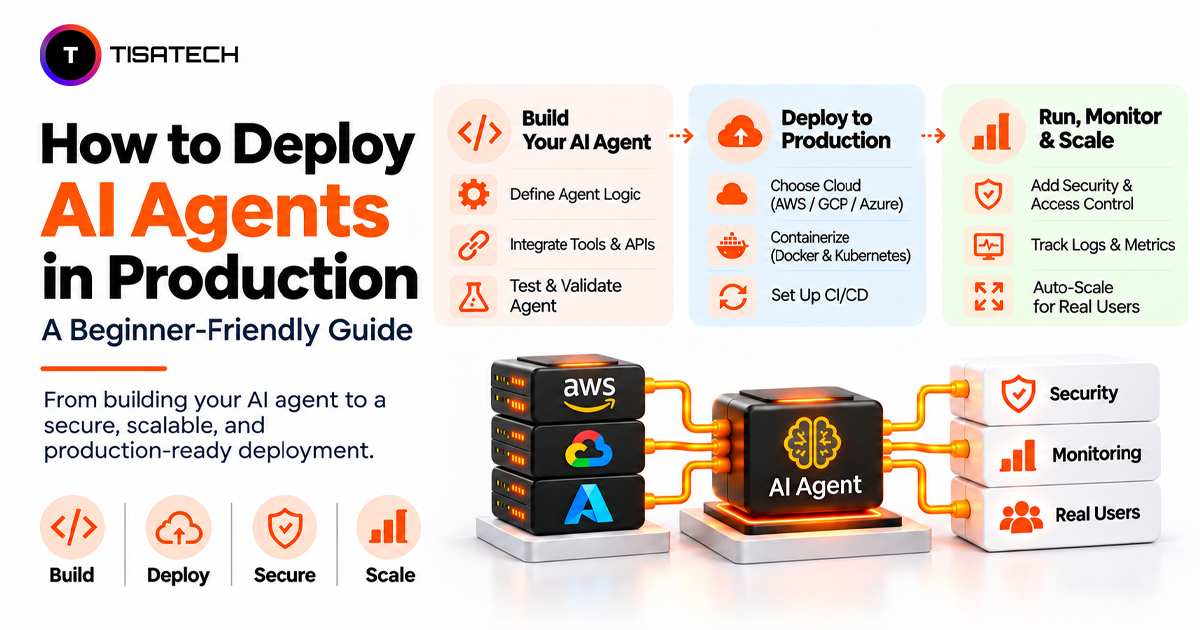
You built an AI agent that answers questions and uses tools on your laptop. But when real users start using it, problems can appear. Responses may become slow, conversation history may disappear, and unexpected inputs may cause the agent to behave incorrectly. Getting an agent to work on your laptop is one thing; making sure it works reliably for real users is another.
Learning how to deploy AI agents in production involves more than hosting a model. Gartner predicts that over 40% of agentic AI projects will be canceled by the end of 2027 because of rising costs, unclear business value, and poor risk management. Google Cloud’s guide to production-ready AI agents also explains what developers need to consider when moving agents from prototypes to real applications.
This guide explains how to prepare an AI agent for real-world use. It covers setting execution limits, choosing hosting infrastructure, securing tool access, testing workflows, and monitoring performance after deployment. By the end, you will understand how to deploy an AI agent and keep it working reliably for real users.

What Does It Mean to Deploy AI Agents in Production?
Deploying an AI agent in production means making it available to real users through a live application or API while ensuring it can handle requests reliably, securely, and at scale. This involves more than hosting the agent. You must also manage conversation state, authenticate users, control tool permissions, and handle failures without losing track of ongoing tasks.
Unlike a basic request-response application, an AI agent can make multiple model calls, retrieve information, and execute actions through external tools. Each step introduces potential delays, errors, security risks, and additional API costs. Developers must set clear execution limits, isolate user data, validate tool actions, and log agent activity.
Microsoft’s AI agent security guidance explains why agent identity, memory isolation, and action-level permissions matter in production.
Why Do AI Agents Fail in Production?
An AI agent may work smoothly during development but struggle when real users start sending requests simultaneously. Server restarts can interrupt active tasks, slow tool calls delay responses, and unexpected prompts expose security weaknesses.
Most production failures fall into four areas:
- Slow Responses: An agent may call multiple APIs, query databases, and process several model responses before completing a task. Timeouts and request limits help prevent slow services from delaying the entire workflow.
- Unreliable Memory: If an application stores conversation history only in server memory, a restart can erase active sessions. Persistent storage keeps conversation history and task state available after interruptions.
- Weak Security Controls: Prompt injection can manipulate an agent into ignoring instructions or misusing connected tools. Developers must validate actions and enforce permissions outside the model to prevent issues such as duplicate emails or unauthorized refunds. OWASP’s agent security guidance explains these risks.
- Uncontrolled Costs: Repeated model calls, unnecessary retries, and agent loops increase token usage and API expenses. Execution limits, token budgets, and retry caps help keep operating costs predictable.
These problems often compound: slow tool calls trigger retries, increasing API usage and operating costs. Without monitoring and execution limits, an agent that works in testing can become unreliable and expensive in production.
How Do You Deploy an AI Agent to Production?
A typical production setup connects the application, agent framework, model APIs, external tools, and persistent storage. For example, FastAPI can handle incoming requests, LangGraph can manage the agent workflow, PostgreSQL can store conversation state, and OpenTelemetry can track execution. Docker packages the application for deployment, while backend permissions control access to external tools.
1. Define the Agent’s Scope and Permissions
Start by defining the tasks the agent can perform, the tools it can access, and the actions that require approval. Use read-only permissions wherever possible, and restrict sensitive operations such as payments, account changes, and data deletion. Clear boundaries prevent the agent from taking actions outside its intended role.
Example: Set Timeouts and Retry Limits
An agent should not keep waiting for an unavailable API or retry a failed request indefinitely. In Python, developers can use HTTPX to set request timeouts and Tenacity to limit retries.
import httpx

from tenacity import retry, stop_after_attempt, wait_fixed

@retry(stop=stop_after_attempt(3), wait=wait_fixed(2))
def call_tool():
    with httpx.Client(timeout=10.0) as client:
        response = client.get("https://api.example.com/data")
        response.raise_for_status()
        return response
2. Set Up Persistent State
Agents often handle multi-step tasks that may continue across several requests. Store conversation history, execution progress, and pending actions so the application can recover after interruptions.
LangGraph checkpointers save workflow state at different execution stages, while PostgreSQL provides persistent storage. For longer-running workflows, Temporal supports durable execution, which means a workflow can resume from its saved progress after a failure instead of starting over.
3. Choose an Agent Framework
Select a framework based on the agent’s workflow, integrations, and control requirements. Common options include:
- LangGraph: Provides control over stateful workflows, execution paths, and human approval.
- CrewAI: Supports role-based multi-agent collaboration.
- LlamaIndex: Focuses on connecting agents to external data and retrieval systems.
- Strands Agents SDK: Provides a code-first approach to building tool-using agents.
Start with a single agent when one workflow can handle the task. Add multiple agents only when separate responsibilities justify the additional coordination and execution overhead.
4. Connect External Tools Securely
Agents need controlled access to databases, search services, and internal APIs. The Model Context Protocol (MCP) provides a standard way to connect AI applications with external tools and data sources.
Tool selection also affects performance and cost. In its MCP code execution experiment, Anthropic demonstrated a reduction in token usage from 150,000 to 2,000 tokens (98.7%) by loading tool definitions only when needed and processing intermediate results through code. This is a specific example, not a guaranteed saving for every agent.
5. Choose a Hosting Environment
Select infrastructure based on expected traffic, data sensitivity, scaling requirements, and operational control.
For example, Amazon Bedrock AgentCore Runtime provides managed agent execution with isolated sessions. Google’s Gemini Enterprise Agent Platform offers managed runtime, session management, security, and observability capabilities.
A private cloud or self-managed environment may suit applications that need tighter control over infrastructure and data. Choose a managed platform if you want less infrastructure maintenance and operational work. Choose self-managed hosting if you need greater control over data, infrastructure, and deployment settings.
Managed vs. Self-Managed Hosting
| Factor | Managed Hosting | Self-Managed Hosting |
|---|---|---|
| Control | Limited infrastructure-level control | Greater control over infrastructure and configuration |
| Operational Effort | Lower maintenance and setup effort | Requires server management, updates, and maintenance |
| Cost | Platform usage and service-based pricing | Infrastructure, maintenance, and engineering costs |
| Best For | Teams that want faster deployment with less infrastructure management | Teams that need custom configurations and greater infrastructure control |
6. Isolate Agent Execution
If an agent runs model-generated code or handles untrusted inputs, execute that code in a restricted environment rather than directly on the application server.
MicroVMs are lightweight virtual machines that run workloads in isolated environments, keeping them separate from the main application. Firecracker is one example. It provides separate kernels and isolated execution environments for running untrusted code. Combine isolation with network restrictions, resource limits, and filesystem permissions to reduce the impact of unsafe code.
How Do You Keep a Live Agent Safe?
Secure an AI agent at the application level, not just through its system prompt. Give it a dedicated identity, scoped permissions, and short-lived credentials. Enforce access checks in the backend so the agent cannot perform actions beyond its assigned role.
Prompt injection can manipulate an agent through user inputs, documents, or retrieved content. Validate inputs, inspect model responses, and restrict tool execution. Services such as Google Cloud Model Armor can screen prompts and responses, but filters should complement – not replace – backend security controls. For practical attack examples, see this guide to prompt injection and the article on AI agent security.
Require human approval before sensitive actions such as payments, refunds, or account changes. Log tool calls, approvals, and execution results so developers can investigate unexpected activity. Also set limits on tokens, tool calls, and execution time to prevent runaway loops and unexpected costs.
Finally, check which compliance requirements apply before deployment. GDPR, HIPAA, and the EU AI Act have different scopes and obligations, while SOC 2 is an assurance framework rather than a law. These requirements can affect data handling, access controls, retention, and audit records.
How Should You Roll Out an Agent Without Breaking Things?
Avoid releasing a new agent version to everyone at once. Use three stages to catch problems before they affect the entire user base.
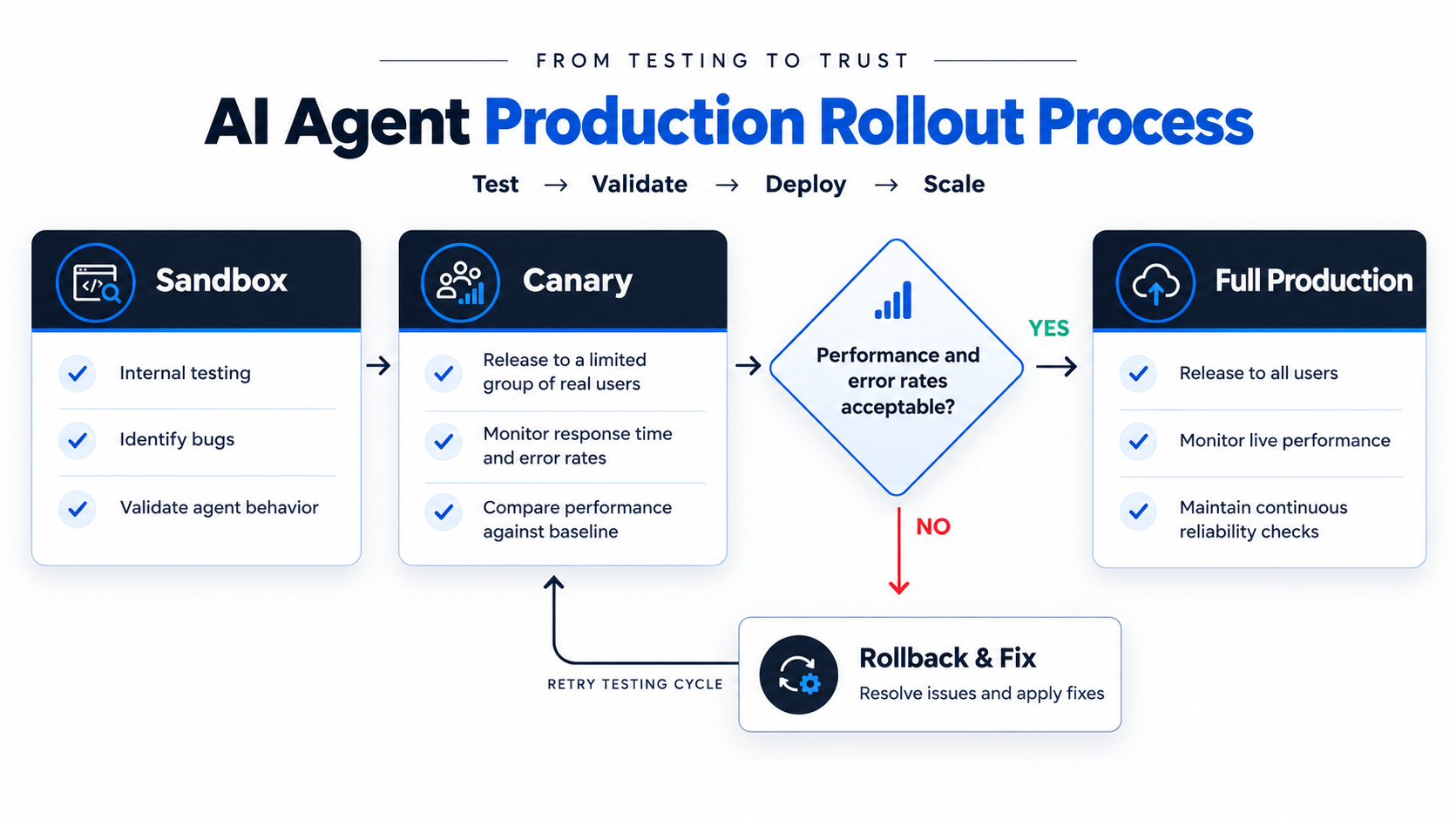
1. Sandbox: Test the agent internally. Check response quality, tool execution, permissions, and failure handling before exposing it to real users.
2. Canary: Release the new version to a small group of users or a limited share of production traffic. Compare task success, error rates, and response times with the stable version. Define rollback conditions before increasing traffic. For example, pause the rollout if task success drops below the agreed threshold, tool errors increase significantly, or response times exceed acceptable limits. Use a feature flag to disable the affected functionality or restore the previous Docker image. Google’s canary release guide explains how to limit user impact during deployment.
3. Full production: Expand access once the canary meets the required quality and reliability targets. Continue monitoring after release to catch issues that appear under higher traffic.
Before each release, run automated checks through the CI/CD pipeline. Include linting, unit and integration tests, prompt regression tests, security scans, and model evaluations. Build and deploy the Docker image only after the required checks pass.
How Do You Monitor AI Agents in Production?
Monitor more than uptime and response time. A production agent also needs tracking for task success, tool errors, token usage, cost per task, and response quality.
For example, if an agent handles 100 customer requests and successfully completes 85, its task success rate is 85%. Track this alongside latency, tool errors, and cost per successful task to understand whether the agent is meeting its production requirements.
Use distributed traces to record each model call, tool invocation, and retrieval step. When an agent gives a wrong answer or fails to complete a task, these traces help identify where the workflow went wrong. Tools such as LangSmith and OpenTelemetry support agent tracing and performance monitoring.
Set alerts for unusual changes, such as rising token usage, repeated tool failures, increased latency, or falling task success rates. These patterns can reveal runaway loops, service problems, or attempts to bypass security controls. Retain error traces for investigation and sample routine traces to manage storage costs.
Connect production traces to regular evaluations. Review failed tasks, identify recurring issues, and add them to regression tests so the same problems are less likely to return. The guide to AI agent observability explains tracing, monitoring, and debugging in more detail.
What Are the Best Practices for AI Agent Deployment?
Start with a single agent and a clearly defined task. Keep its workflow focused and avoid adding tools that the task does not require. Use a secrets manager to handle API keys and credentials securely instead of storing them in source code.
Make tool actions safe to retry. An idempotency key is a unique ID that prevents the same operation, such as a payment or booking, from running twice. Use these keys for payments, bookings, and record creation to avoid duplicate actions when a request runs more than once. The AWS Well-Architected guidance explains how idempotency helps prevent repeated side effects.
Test failure scenarios before launch. Simulate timeouts, unavailable tools, interrupted workflows, and failed model calls to check whether the agent can recover without losing task state. Set token, execution-time, and API budgets to control resource usage.
Finally, review production traces regularly and document important decisions, including tool permissions, retry rules, and recovery procedures. This gives the development team a consistent approach to maintaining and improving the agent.
Can Students Deploy AI Agents for Free?
Yes. Students can build and deploy small AI agent projects without paying upfront.
Start locally, then use Docker to package the application for deployment. To avoid model API charges during development, run a lightweight model locally with Ollama. When cloud hosting is needed, check options such as the Google Cloud Free Tier, which offers free usage within specified limits.
Keep the project small, set token and usage limits, and share it with a few testers. Free plans have restrictions on compute, memory, and usage, and exceeding their limits can trigger charges. Check the pricing terms before deploying.
| Follow Us for Daily Tech Tips |



|
How Can Students Practise AI Agent Deployment?
At TISA-TECH, students can learn AI agent deployment through practical projects. They can build a Python-based AI agent, connect it with APIs and databases, and test how it handles different user requests.
For practice, students can check what happens when an API fails, a database connection is lost, or a user sends repeated queries. They can also track response time and errors to understand how the agent performs after deployment.
These projects help students improve their Python, backend development, AI integration, and debugging skills. TISA-TECH also helps students prepare for job opportunities through its Generative AI training and IT career support.
Conclusion
Deploying AI agents in production takes more than making a model work. A production-ready agent needs to remember previous tasks, use tools safely, follow execution limits, and track whether it completes tasks correctly. Follow OWASP’s AI agent security practices to control permissions and protect sensitive actions. Use OpenTelemetry to track errors in model calls and tool execution.
Start with one clear task. Test what happens when a request times out, a tool fails, a task stops midway, or the agent receives unexpected input. After launch, track task success, response time, errors, and cost per task. Use these results to fix problems before giving the agent more tools or responsibilities.
FAQs Section
Ans. Yes. A laptop with a stable internet connection can handle small agent projects that use cloud-based model APIs. If you want to run models locally, tools such as Ollama let you test models on your own machine, depending on its hardware.
Ans. Start with Python, REST APIs, basic database operations, and Git. Then learn how to connect an LLM to tools, manage conversation state, use Docker, and deploy an application. These skills help you build and maintain an agent beyond a local demo.
Ans. The cost depends on model API usage, hosting, database storage, tool integrations, and traffic volume. Small agents may run on low-cost infrastructure, while agents handling frequent requests or complex workflows can cost significantly more. Set token budgets, limit unnecessary model calls, and monitor cost per successful task to keep expenses under control.
Ans. Build an agent that solves a specific problem, such as answering customer queries from a product FAQ database. Include its source code, setup instructions, API integration, database connection, deployment steps, and a short demo. Also document how it handles failed requests and restricts tool access.