A RAG chatbot can return the wrong answer even when its language model works correctly. Often, the problem starts during retrieval: the app fails to find the document chunks that actually answer the question.
Hugging Face embeddings are pre-trained models that convert text into numerical vectors, so a RAG application can search documents by meaning rather than exact keywords. The model you choose affects retrieval quality, speed, and memory usage, so a larger model is not always the better choice.
You can download open embedding models from the Hugging Face Model Hub and run smaller ones locally without paying an API fee. Hosted inference is another option, but its pricing and free credits depend on the provider and plan. This guide covers model selection, Python implementation with LangChain, and retrieval testing using real questions.

How do embeddings work in RAG?
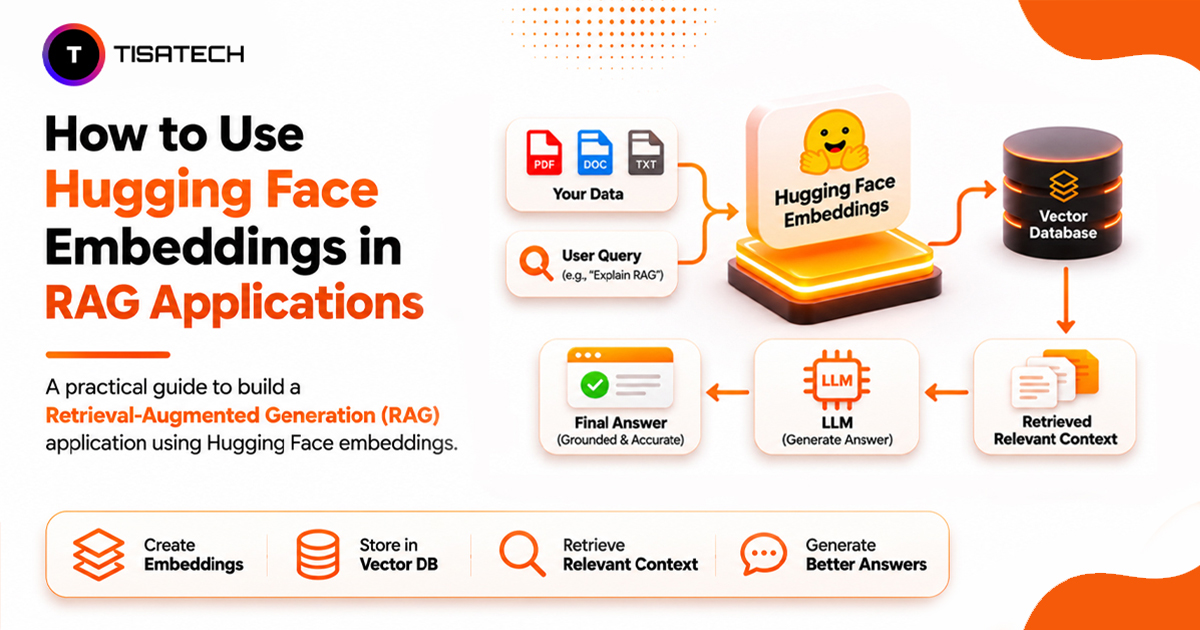
An embedding model converts text into a fixed-length list of numbers called a vector. These numbers represent patterns in the text, allowing a computer to compare meaning rather than relying only on matching keywords.
For example, a user might ask, “How can farmers grow crops in dry regions?” A semantic search system can retrieve a document about “desert agriculture techniques” even though both use different words.
In a RAG application, the embedding model handles two inputs:
- Documents: The application splits documents into smaller chunks, converts each chunk into a vector, and stores those vectors in a vector database.
- User questions: When someone asks a question, the same embedding model converts it into a vector so the application can compare it with the stored document vectors.
The database ranks document chunks by similarity, commonly using cosine similarity. A higher cosine similarity score generally indicates a closer match. The retriever then returns the most relevant chunks to the language model, which uses that context to generate an answer.
This is why embedding quality matters: even a capable language model can produce an incorrect or incomplete answer if retrieval misses the relevant information.
Which Hugging Face embedding model is best for RAG?
The best embedding model depends on your data, language, and available hardware. Some models prioritize speed, while others offer stronger retrieval or multilingual support. Here are four useful options for RAG projects:
| Model | Vector size | Max input | Best suited for |
|---|---|---|---|
| all-MiniLM-L6-v2 | 384 | 256 tokens | Lightweight projects and CPU-based learning |
| bge-large-en-v1.5 | 1,024 | 512 tokens | English document retrieval |
| mxbai-embed-large-v1 | 1,024 | 512 tokens | English semantic search and retrieval |
| bge-m3 | 1,024 | 8,192 tokens | Multilingual and long-document retrieval |
For a beginner RAG project, start with all-MiniLM-L6-v2. It is small, fast, and suitable for learning on a CPU. If your documents contain Hindi, English, or mixed-language content, test BGE-M3 instead. It supports over 100 languages and handles inputs of up to 8,192 tokens, but its larger size requires more computing resources.
Before selecting a model, check three things:
- Language support: Match the model to your documents and users’ questions. English-focused models may perform poorly on Hindi or mixed-language queries.
- Input length and memory: Check the token limit to avoid truncating important text. Larger models also need more memory and processing time.
- Retrieval performance: Compare models against your document collection instead of relying only on published benchmark scores.
The MTEB leaderboard helps compare embedding models across tasks. For RAG, focus on retrieval results rather than the overall score because a model that performs well on classification or clustering may not perform equally well on document retrieval.
Also, check the model card before generating embeddings. Some models require specific instructions for queries and documents. For example, E5 models use query: for questions and passage: for document chunks, while BGE-M3 does not require these prefixes. Follow the instructions for your selected model to avoid reducing retrieval quality.
Can I use Hugging Face embeddings for free?
Yes. You have two options:
1. Run models locally: Download an embedding model from the Hugging Face Model Hub and run it using Python. After downloading, you can generate embeddings offline without paying API charges.
2. Use hosted inference: Hugging Face Inference Providers let you generate embeddings through an API without managing the model. Free credits are limited, and additional usage may require payment.
If your laptop struggles with larger models, try Google Colab for GPU access when available.
For learning and small RAG projects, local inference is usually enough.
How to use Hugging Face embeddings with LangChain?
LangChain connects Hugging Face embedding models to a vector database, making it easier to build a RAG pipeline. The following example uses Sentence Transformers for local embeddings, Chroma for storage, and Ollama for answer generation.
Step 1: Install the packages
The [full] extra includes Sentence Transformers, which HuggingFaceEmbeddings needs for local inference.
Step 2: Load the embedding model
The model downloads when you run it for the first time. Use “cuda” instead of “cpu” if your system has a compatible GPU and CUDA-enabled PyTorch.
Step 3: Split and store your documents
The splitter divides longer documents into smaller chunks. The overlap helps preserve context between them. Chroma stores the embeddings locally in ./chroma_db. The three sample documents above are short, so splitting has little effect here; the splitter becomes more useful when you load longer files, such as PDFs or notes.
Step 4: Retrieve relevant chunks
This retrieves the two closest chunks for the question. Use the same embedding model for documents and queries so their vectors remain comparable.
Step 5: Generate an answer with a language model
Install Ollama and download the model:
Then connect it to the retriever:
The retriever supplies relevant chunks, and the language model uses them to generate an answer. You can replace Ollama with another LangChain chat model without changing the embedding setup.
Using hosted Hugging Face embeddings
If your system cannot run the embedding model locally, use HuggingFaceEndpointEmbeddings with a supported hosted model.
Set your Hugging Face token as the HUGGINGFACEHUB_API_TOKEN environment variable, then use:
Create a token from Hugging Face Settings. Keep it private, and check Inference Providers to confirm that your selected model is supported.
Model availability, supported providers, and inference pricing can change over time, so check the current Hugging Face documentation before choosing a hosted model.
How do I check if my retrieval works?
Test retrieval before changing your language model. Create ten questions from your documents and note which chunk should answer each one. Then see whether the retriever includes that chunk among its top results.
This measures Hit Rate@2: how often the expected text appears among the two retrieved chunks. Because the example uses only three short documents and retrieves two chunks, it will often return a 100% score. Run the test on your own document collection with a larger set of representative questions to get a more meaningful result. This exact-text matching is a simple learning check, not a full evaluation of retrieval quality, because relevant chunks may use different wording.
For a more reliable evaluation, use metrics such as Recall@K and Mean Reciprocal Rank (MRR) to check whether relevant chunks appear near the top of the retrieved results.
If retrieval misses relevant content, check these common causes:
- Chunk size: Test different chunk sizes and overlap values to find what works best for your documents.
- Language support: Use a multilingual model for Hindi or mixed-language content.
- Model instructions: Follow the query and document formatting requirements in the model card.
- Ranking: If relevant chunks appear lower in the results, retrieve more candidates or test a re-ranker such as BGE Reranker v2 M3.
For more advanced techniques, see the Hugging Face Advanced RAG Cookbook.
What mistakes should students avoid with Hugging Face embeddings?
Small setup mistakes can affect retrieval even when your RAG application runs without errors. Students should also watch out for these problems:
Reusing an outdated vector index: If you change the embedding model, regenerate document embeddings and rebuild the index. Old vectors may not be compatible with the new model.
Skipping retrieval tests: Test representative questions against your own documents before evaluating generated answers.
Fine-tuning too early: Fix retrieval problems first. Better indexing, model selection, or ranking may improve results without requiring fine-tuning.
| Follow Us for Daily Tech Tips |



|
How does TISA-TECH help students in Jaipur?
Working with Hugging Face embeddings becomes more useful when students apply them to real RAG projects. Building these applications helps them understand how document processing, embedding models, vector databases, and retrieval work together to find relevant information and generate accurate responses.
TISA-TECH gives students in Jaipur practical experience with these concepts through hands-on AI projects. Students can build RAG chatbots using their own documents, experiment with Hugging Face embedding models, and evaluate retrieval results. The internship programme provides an opportunity to apply these skills to practical tasks and develop projects they can showcase in their portfolios.
Conclusion
A good RAG application depends on finding the right information before generating an answer. Hugging Face embeddings help you build this search layer using models that you can run locally or access through hosted inference.
Start with a small model, store your document embeddings, and test retrieval with questions your users might actually ask. If the results are weak, review your chunk sizes, language support, and model instructions before changing the language model.
FAQs Section
Ans. Yes. Multilingual models such as BAAI/bge-m3 support Hindi and many other languages. Test the model with both Hindi questions and Hindi documents to check retrieval quality.
Ans. all-MiniLM-L6-v2 is a practical starting point because it is lightweight and runs on a CPU. For multilingual projects, test BGE-M3 and compare the results.
Ans. Yes. You can use the sentence-transformers Python library directly to convert text into vectors. LangChain is optional; it helps connect embeddings with document loaders, text splitters, and vector databases.
Ans. You only need to generate embeddings for the new document chunks and add them to your vector database. You do not need to re-embed existing documents unless you change the embedding model or your indexing setup.
Ans. Your RAG application may retrieve irrelevant documents because of poor chunking, an unsuitable embedding model, or incorrect retrieval settings.