We have to know, technology is shaping life everywhere. From the apps we use daily to AI tools in offices, development has become the backbone of modern work. In Jaipur and across India, the demand for skilled developers is rising fast. Companies want fresh talent who can build projects, solve problems, and quickly adapt to new tools.
For beginners, this feels exciting but also a little overwhelming. You open your laptop, install VS Code, and start coding. Soon you notice professionals write faster, make fewer mistakes, and look more confident. The difference isn’t just practice – they use smart tools inside their editor. These tools are called extensions. They make coding smoother, save time, and help you avoid errors.
In this guide, we’ll explore 10 VS Code extensions every beginner developer must install today. These are the best VS Code extensions 2026 – updated and useful tools that make coding easier and more enjoyable. Beginners in Jaipur can use them to learn faster, gain confidence, and work on real projects without feeling stuck.
Why VS Code Extensions Matter
Visual Studio Code is already a powerful editor, but extensions take it to the next level. They add features that help developers work faster and avoid mistakes.
For beginners, extensions act like helpers. They guide you, automate tasks, and improve code quality. That’s why developers everywhere look for the best VS Code extensions 2026 – tools that boost productivity and make coding easier.
If you’re just starting out, the extensions below are trusted by developers worldwide and will make your learning smoother.

Top 10+ VS Code Extensions in 2026
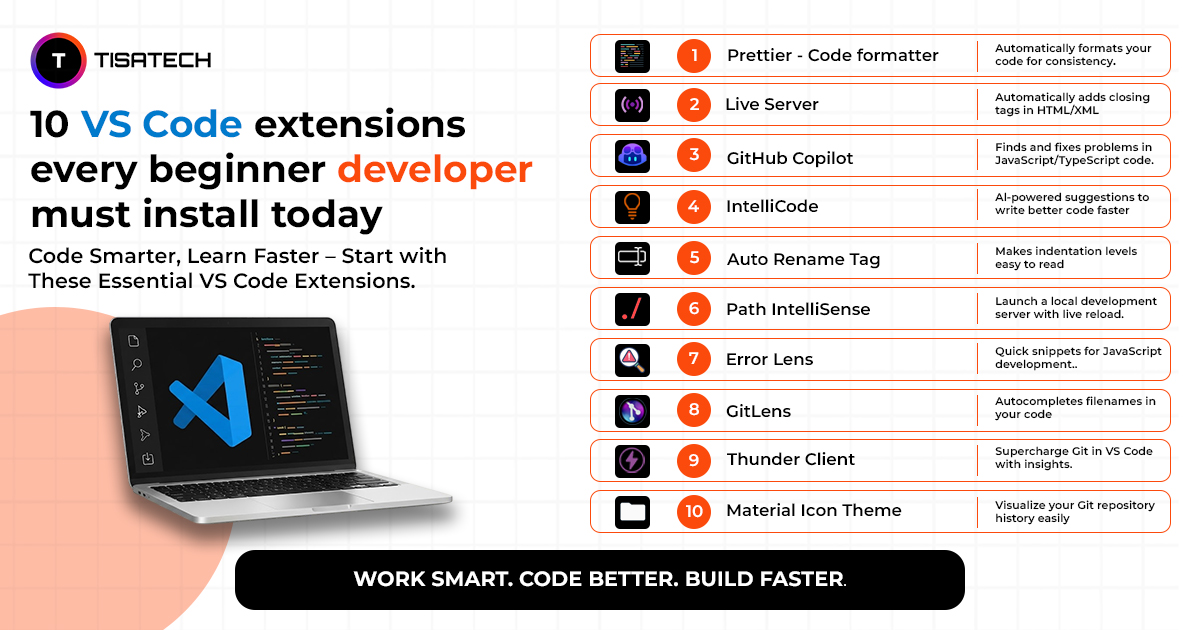
Here are the top VS Code extensions every beginner should install. They are simple, practical, and widely used. These tools save time, reduce errors, and make coding more enjoyable. With them, beginners can learn faster and feel confident while working on projects.
1. Prettier
Prettier is one of the most popular VS Code extensions. It formats code automatically and keeps it clean. Beginners often face problems with indentation and structure, but Prettier fixes these with one click. The code becomes neat, organized, and easy to read. Because clean code improves teamwork and readability. Most professional developers always include Prettier in their setup.
📦 Marketplace: Prettier for VS Code
🌐 Official Site: prettier.io
💻 GitHub: prettier/prettier
2. Live Server

Live Server is a must-have extension for web development beginners. It opens your project in the browser and refreshes it automatically whenever you save changes. Without it, you have to refresh the browser manually each time, which wastes time. Live Server removes that extra step, saving time and making your workflow smoother. If you are learning HTML, CSS, or JavaScript, this extension will make coding faster and easier.
📦 Marketplace: Live Server
💻 GitHub: Live Server on GitHub
3. GitHub Copilot

GitHub Copilot is one of the most popular developer tools. It uses AI to suggest code while you type. Beginners often struggle with syntax and patterns, but Copilot gives helpful suggestions that make learning faster. It does not replace learning. Instead, it works like a coding assistant that shows different solutions and helps you understand them better. Many developers now consider it one of the top VS Code extensions for modern development.
📦 Marketplace: GitHub Copilot
🌐 Official Site: github.com/features/copilot
💻 GitHub: github/copilot-docs
4. IntelliCode

Building smarter software, empowering developers, and shaping the future of technology.
IntelliCode is an AI-powered extension that improves coding speed. It looks at your code and gives smart suggestions. The tool predicts what you might write next and shows useful snippets. This reduces typing and makes coding faster. For students learning modern practices, IntelliCode is one of the most helpful VS Code extensions 2026.
📦 Marketplace: Visual Studio IntelliCode
🌐 Official Site: visualstudio.microsoft.com/services/intellicode
💻 GitHub: MicrosoftDocs/intellicode
5. Auto Rename Tag

A simple solution for smarter file management and improved productivity.
Auto Rename Tag is a helpful extension for HTML beginners. Many learners change the opening tag but forget the closing tag. This tool updates both tags at the same time. It prevents mistakes, saves effort, and makes coding faster. That’s why it is one of the most practical VS Code extensions for beginners.
📦 Marketplace: Auto Rename Tag
💻 GitHub: formulahendry/vscode-auto-rename-tag
6. Path Intellisense

Path Intellisense helps developers find file paths quickly. As you type, it suggests folders and files from your project. This reduces mistakes and speeds up development. Beginners don’t need to search through folders to find the right path. Many developers call it an essential VS Code extension because it improves accuracy and saves time.
📦 Marketplace: Path Intellisense
💻 GitHub: ChristianKohler/PathIntellisense
7. Error Lens

Error Lens shows coding errors right inside the editor. You don’t need to open a separate panel because problems appear exactly where they happen. This makes it easy for beginners to spot mistakes and fix them quickly. Debugging feels less stressful since issues are visible right away. That’s why many developers see Error Lens as a must-have VS Code extension.
📦 Marketplace: Error Lens
💻 GitHub: usernamehw/vscode-error-lens
8. GitLens

GitLens makes Git easy to understand. It shows details about code changes and file history. Version control is important for every developer, but beginners often find Git confusing. GitLens solves this by showing clear information inside VS Code. It is one of the VS Code extensions every developer should use for real projects.
📦 Marketplace: GitLens
🌐 Official Site: gitkraken.com/gitlens
💻 GitHub: gitkraken/vscode-gitlens
9. Thunder Client
Thunder Client lets you test APIs inside VS Code. When learning backend development, you need to send requests and check responses. This tool makes the process simple and easy. Beginners like it because the interface is clean and easy to use. It is also one of the best free VS Code extensions 2026 for new developers.
📦 Marketplace: Thunder Client
🌐 Official Site: thunderclient.com
💻 GitHub: rangav/thunder-client-support
10. Material Icon Theme

Material Icon Theme makes VS Code look better. It adds clear icons for different files and folders. This doesn’t change your code, but it helps you move through projects more easily. Better organization makes development smoother. That’s why many developers install it right after setting up VS Code.
📦 Marketplace: Material Icon Theme
💻 GitHub: PKief/vscode-material-icon-theme
11. Code Spell Checker

Code Spell Checker helps you catch spelling mistakes in code. Small errors can confuse readers and make projects look unprofessional. This tool checks comments, variable names, and text content for spelling issues. It keeps your code clean and easy to read. It is simple, but it builds good coding habits early.
📦 Marketplace: Code Spell Checker
🌐 Official Site: streetsidesoftware.com/vscode-spell-checker
💻 GitHub: streetsidesoftware/vscode-spell-checker





Best Place to Learn VS Code Extensions in Jaipur
If you want to learn VS Code extensions in Jaipur, the best place is TISA-TECH. Students use tools like Git Lens, Thunder Client, and Error Lens every day while working on real projects. This hands-on practice makes learning simple and practical.
You can become a full stack developer with TISA-TECH by applying these extensions to real coding tasks such as version control, API testing, and debugging. The institute designs offers job‑oriented tech courses where every lesson teaches exactly what companies expect from developers.
Along with full stack development, TISA-TECH offers AI-Powered tech courses in cloud computing, digital marketing, UI/UX design, and graphic design. For students interested in AI, there is also a list of AI courses to avail in Jaipur. These courses combine coding with modern AI tools, helping learners gain skills that are highly in demand today.
TISA-TECH stands out because students practice extensions in real projects, build confidence, and prepare for successful careers in development.
Conclusion
The right tools make coding smoother and more effective. They help you avoid mistakes, save time, and gain confidence as you learn. The extensions we discussed are trusted by developers worldwide and remain among the best VS Code extensions 2026. For beginners, practicing these tools step by step speeds up learning and improves code quality. Success in programming always comes from regular practice, and with guidance from TISA‑TECH, you get the right support to grow into a confident developer.