UI/UX design has become a growing career option in Jaipur over the past two years. Fintech startups in Malviya Nagar, e-commerce businesses in Mansarovar, and IT companies in Sitapura are hiring UI/UX designers to create better digital experiences. This role has become more common than it was a decade ago.
According to the US Bureau of Labor Statistics, employment for Web and Digital Interface Designers is projected to grow by 7% between 2024 and 2034. In India, recrew.ai’s salary data shows UX/UI designer salaries ranging from ₹3.5 LPA to ₹50 LPA. Its data also reports an average salary of around ₹8.7 LPA for dedicated UX designers and ₹6.5 LPA for combined UI/UX designers. Salaries vary based on experience, skills, and the company.
Many beginners struggle because they start using Figma before understanding the basics of good design. They focus on creating attractive screens without knowing why a button, layout, or navigation element belongs in a particular place. A clear 2026 UI/UX roadmap helps beginners learn these concepts in the right order. It explains what to study first, which skills to develop next, and which advanced topics to explore later.

What UI and UX Actually Mean and Why This Roadmap Covers Both
UX (User Experience) focuses on how people interact with a product and how easily they can complete their tasks. It includes user research, user flows, and problem-solving. UI (User Interface) focuses on the product’s visual design, including colours, typography, and layout. Many entry-level design roles in India expect beginners to understand both UI and UX, so this roadmap covers them together instead of treating them as separate skills.
You need to build your skills in the right order to become job-ready. Start with design fundamentals, then learn user research, sketch your ideas, and move on to design tools such as Figma. Once you understand the basics, apply your skills to real projects and prepare for job applications. Many beginners start with Figma tutorials without learning design principles first. This approach can make it harder to create designs that solve real user problems. Following a structured roadmap helps you build a strong foundation before moving to advanced skills.
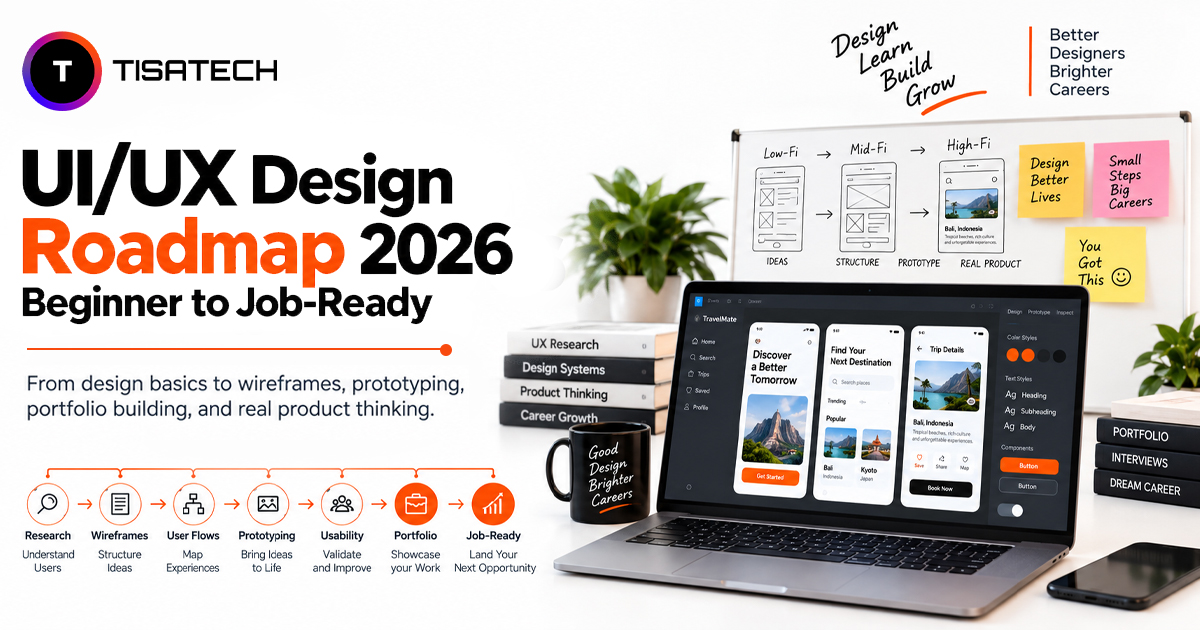
UI/UX Design Roadmap 2026: From Beginner to Job-Ready
Becoming a job-ready UI/UX designer takes more than learning design tools. You need to understand design principles, research user needs, plan your ideas, and practise through real projects. This roadmap takes you through five stages, from learning the basics to building a portfolio and preparing for entry-level roles.
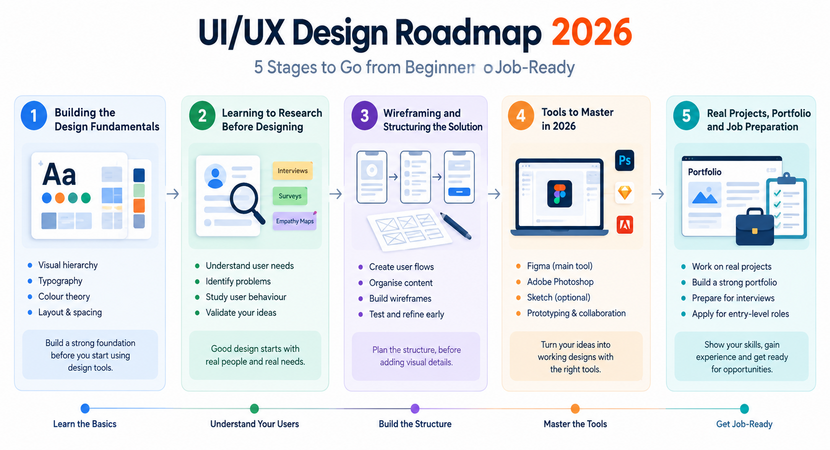
Stage 1: Building the Design Fundamentals
Before using Figma, learn the basic principles of good design. These principles help you create interfaces that look organised and are easy to use.
Start with visual hierarchy to understand how size, colour, and placement guide a user’s attention. Then, learn typography, including font size, spacing, and line height, to make text easy to read. Study colour theory to understand contrast, colour combinations, and basic accessibility. Finally, practise layout and spacing, including grids, alignment, and whitespace, to keep your designs balanced.
Many beginners start with design software without understanding these fundamentals. This can make it difficult to identify why a design looks unbalanced. Learning the basics first helps you make more thoughtful design decisions.
Stage 2: Learning to Research Before Designing
Good UI/UX design begins with understanding the people who will use a product. User research helps you identify their needs, problems, and expectations before deciding how the interface should look or work. The Nielsen Norman Group offers useful resources on user-centred design and research methods.
As a beginner, you can practise with short interviews, simple surveys, and empathy maps. For example, you could speak with classmates about how they use a food delivery app and what difficulties they face. This gives you a better understanding of the problem before creating a solution. Without research, a design may look attractive but fail to address the user’s actual needs.
Stage 3: Wireframing and Structuring the Solution
Understanding the user’s problem gives you a starting point for planning the app. Begin with a user flow to show the steps users will follow, such as booking a cab or ordering food. Then, organise the content and arrange the information in a logical order so users can find what they need easily.
Next, create simple wireframes on paper or in a design tool before adding colours and other visual details. Rough sketches allow you to test ideas and fix layout problems early. Beginners who start with detailed screens may find it harder to make structural changes later. Practising wireframing first helps you plan interfaces with a clear and user-friendly structure.
Stage 4: Tools to Master in 2026
Design tools help you turn your research, wireframes, and ideas into working interface designs. Figma is one of the main tools to learn because it allows you to create screen designs, reusable components, responsive layouts, and interactive prototypes. Features such as auto layout and components help you maintain consistency, while prototyping lets you show how users move through a product.
You can also use FigJam for brainstorming, organising research findings, and creating user flows. In 2026, AI tools can support your workflow by suggesting early layout ideas and helping with UX copywriting. However, use AI as a supporting tool and make your design decisions based on user needs and usability.
Figma is relevant to UI/UX design roles in India, where job requirements often include wireframing, prototyping, usability, and collaboration skills. Rather than trying to learn every available design tool, focus on practising Figma through real projects. Building confidence with one core tool will give you a stronger foundation for learning others.
Stage 5: Building a Job-Ready Portfolio in 2026
A portfolio gives you a place to present the UI/UX skills you have developed through practice. Aim to create three to five strong projects based on real problems, such as redesigning a local shop’s ordering app, creating a dashboard, or improving an e-commerce checkout process.
Each project should include a clear case study that explains the original problem, user research, wireframes, design decisions, and final result. Show how your ideas developed and explain why you chose a particular design approach. This allows employers to understand your problem-solving process instead of seeing only the finished screens.
After building a few solid projects, you can start applying for UI/UX internships and junior design roles in India. Platforms such as LinkedIn and Naukri can help you explore relevant opportunities and job requirements. Feedback from mentors or experienced designers can help you improve your work, while practising how you explain your design decisions can prepare you for interviews.
Does UI/UX Design Require Coding in 2026?
Coding requirements can vary depending on the UI/UX role and the company. Current job-search results in India include UI/UX positions that mention HTML and CSS alongside design skills, so basic coding knowledge can be useful for some roles. However, the specific requirements depend on the position.
For beginners, the main focus should be on user research, wireframing, visual design, prototyping, and usability. Learning basic HTML and CSS can help you understand how websites are built, communicate with developers, and recognise technical limitations while designing an interface.
How Long Does It Take to Become a Job-Ready UI/UX Designer in 2026?
Becoming a job-ready UI/UX designer can take around six months with consistent part-time learning. This timeline covers the essential skills, practical projects, and portfolio preparation required to start your UI/UX career.
- Months 1-2: Learn design fundamentals, typography, colour theory, layouts, and basic UX concepts.
- Months 3-4: Practise user research, user flows, wireframing, and prototyping using Figma.
- Month 5: Work on practical UI/UX projects, improve visual design skills, and explore AI-assisted design workflows.
- Month 6: Build case studies, complete your portfolio, and prepare for internships or junior UI/UX roles.
The actual timeline depends on your learning pace, practice hours, and previous experience. Consistent practice can help you make steady progress throughout the six-month roadmap.
Is UI/UX Design Still a Good Career Choice in 2026?
UI/UX design offers career opportunities as businesses continue to invest in websites, mobile apps, and digital products. According to the U.S. Bureau of Labor Statistics (BLS) , employment for web and digital interface designers may grow by 7% between 2024 and 2034.
In India, product startups, fintech companies, e-commerce businesses, and IT services firms create opportunities for UI/UX designers. Learning specialised skills can help designers strengthen their career profiles. Areas such as design systems, fintech UX, and AI interface design allow designers to develop expertise in specific industries and design requirements. The Recrew salary guide reports that designers with these specialised skills may earn 20–35% more than generalist designers.
AI tools now help designers with tasks such as idea generation, research support, and design production. However, designers still need to understand user needs, apply good judgement, and solve problems effectively. Combining strong design fundamentals with specialised skills and practical experience can help beginners prepare for UI/UX opportunities in 2026.





Following the 2026 UI/UX Roadmap With Guidance in Jaipur
Learning UI/UX design on your own can feel challenging, especially when you start working on wireframes, prototypes, and practical projects. A structured course can help you follow each stage with proper guidance and regular practice.
TISA-TECH’s UI/UX Design Course , located in Jhotwara, Jaipur, offers a six-month programme that combines classroom learning with practical projects. The course covers Figma, wireframing, prototyping, user psychology, colour theory, usability testing, and AI design tools. Students also receive mentor feedback while working on projects and building their portfolios.
Along with classroom training, the programme includes internship opportunities and placement support to help students gain practical exposure and prepare for career opportunities in UI/UX design. Students can develop their skills through project-based learning, guidance, and portfolio preparation while following the key stages discussed in this roadmap.
Conclusion
A UI/UX design career starts with learning the basics and gradually applying them to real projects. As you move through each stage, you gain a better understanding of how good design works and what users need. Regular practice, feedback, and project experience help you improve your skills and build a portfolio that reflects your progress. With consistent effort, you can prepare yourself for your first opportunity in UI/UX design.
FAQs Section
Ans. Graphic design focuses on creating visual content such as posters, logos, and branding materials. UI/UX design focuses on the appearance and usability of digital products, such as websites and mobile applications. Both fields require creativity and design skills, but their work goals are different.
Ans. Yes, you can start learning UI/UX design without coding experience. However, basic knowledge of HTML, CSS, and website development can help you understand how designers and developers work together.
Ans. Yes, graphic designers can move into UI/UX design by learning user research, wireframing, prototyping, and usability testing. Their existing knowledge of layout, typography, and colour can help them create better digital interfaces.
Ans. Yes, TISA-TECH offers an offline UI/UX design course in Jaipur. The programme includes practical training, project guidance, internship opportunities, and placement support to help students prepare for career opportunities in UI/UX design.
Ans. Figma is commonly used for interface design, wireframing, prototyping, and collaboration. Depending on the company or project, designers may also use tools such as Adobe Photoshop and Sketch.