Ever wondered where your photos, Netflix shows, or WhatsApp backups go when they’re not on your phone? They don’t disappear, they are stored on the cloud. Cloud computing works in the background and manages all this data so everything runs smoothly. You can access it anytime without even thinking about it.
What Is Cloud Computing?
Cloud computing is a technology that provides computing services like storage, servers, databases, software, and networking over the internet instead of using local devices. It allows users to access and manage data anytime and anywhere with an internet connection without needing to install heavy software or maintain physical hardware. This makes it flexible, scalable, and cost-effective for individuals and businesses.
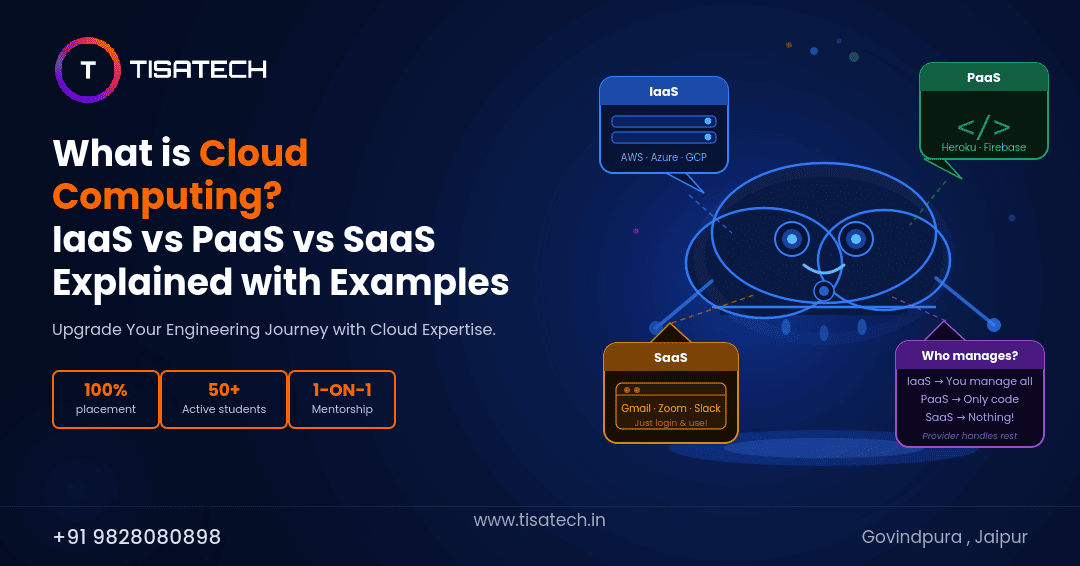
Cloud computing is mainly divided into three service models: Infrastructure as a Service (IaaS), Platform as a Service (PaaS), and Software as a Service (SaaS). These models make cloud computing simple, efficient, and widely used in today’s digital world.
Let’s understand all these service models with example –
What Is IaaS?
Infrastructure as a Service (IaaS) is a cloud computing model where businesses rent basic IT resources like virtual servers, storage, and networking from a cloud provider instead of buying physical hardware. This means companies don’t need to invest in expensive machines or maintain data centers. They can simply use resources over the internet as needed.
Organizations get high flexibility and control with IaaS. They can choose how to organise and manage their systems according to their requirements. However, they are still responsible for managing things like operating systems, applications, security updates, and data.
Businesses also use IaaS to scale their systems easily. This helps them stay flexible, efficient, and ready for future growth or changes in work.
 WhatsApp Chat
Let’s understand it in simple way –
IaaS is like renting a car. The provider gives you the vehicle, but you control how you use it. You drive it, manage fuel, and take care of maintenance. Similarly, in IaaS, the provider offers servers and infrastructure. You handle setup, applications, and system management based on your needs.
Examples of IaaS: Amazon Web Services (AWS), Google Compute Engine (GCE), IBM Cloud, Microsoft Azure.
Also Read: Cloud Computing Roadmap 2026: A Student’s Guide to Becoming a Job-Ready Cloud Engineer
What Is PaaS?
Platform as a Service (PaaS) is a cloud computing model where developers use a ready-made platform. Developers can build, run, and manage applications without worrying about infrastructure like servers, storage, or networking. This means businesses don’t need to handle hardware or system setup. They can directly focus on coding and application development.
Organizations get high efficiency with PaaS. The cloud provider manages the infrastructure, operating systems, and runtime environment. Developers only need to handle application code and data. This reduces complexity and saves time. However, users still manage their applications and ensure proper functionality.
Businesses use PaaS to develop and deploy applications faster. It supports quick testing, updates, and scaling based on demand. This helps companies stay productive, innovative, and competitive in the market.
Let’s understand it in a simple way –
PaaS is like renting a fully furnished and equipped kitchen. The provider gives you all tools, equipment, and setup. You just focus on cooking. Similarly, in PaaS, the provider manages the platform, and you focus on building applications.
Examples of PaaS: Google App Engine, Microsoft Azure App Services, Heroku, AWS Elastic Beanstalk
What Is SaaS?
Software as a Service (SaaS) is a cloud computing model where users access software applications over the internet instead of installing them on their computers. This means businesses and individuals don’t need to download, manage, or maintain software on their devices. They can simply use applications through a web browser.
Organizations get ease of use and convenience with SaaS. The cloud provider manages everything, including servers, applications, updates, and security. Users only need to log in and use the software. They don’t have to worry about technical setup or maintenance.
Businesses use SaaS to save time and cost. It allows teams to access software from anywhere and collaborate easily. SaaS can also scale based on the number of users, making it flexible for growing companies.
 Instagram Page
Let’s understand it in simple way –
SaaS is like watching movies on a streaming platform like Netflix. You don’t download or store the movie, you just access it online. Similarly, in SaaS, you use software over the internet without installing it.
Example of SaaS: Customer Relationship ,Management (CRM) systems, Email Services, Office Productivity Tools.
IaaS vs PaaS vs SaaS: Comparison Table
IaaS, PaaS, and SaaS are three cloud service models. These models differ in control, responsibility and other features.
| Feature | IaaS | PaaS | SaaS |
|---|---|---|---|
| Full Form | Infrastructure as a Service | Platform as a Service | Software as a Service |
| What You Get | Virtual servers, storage, networking | Platform to build and deploy apps | Ready-to-use software |
| What You Manage | Operating System, middleware, apps, data, security | Apps and data only | Nothing — just use it |
| Provider Manages | Hardware, virtualization, networking | OS, middleware, runtime | Everything (hardware, platform, software) |
| Control Level | High | Medium | Low |
| Technical Skill | High (IT admin) | Medium (developer) | Low (any user) |
| User Responsibility | Setup, configure, secure, update | Write and deploy code | Just log in and use |
| Best For | Full infrastructure control | Developers building apps | End users needing software |
| Scaling | Manual or auto controlled by user | Automatic by provider | Automatic |
| Payment Model | Pay per hour or GB usage | Pay per use or per user | Subscription (per user/month) |
| Examples | AWS, Google Compute Engine, Microsoft Azure | Google App Engine, Azure App Services, Heroku | CRM systems, Email services, Office tools |
When Should Use IaaS, PaaS And SaaS
We use IaaS, PaaS, and SaaS to avoid buying and managing physical hardware or software. We should use these models under following circumstances:
a. When the requirement is for a short period (for example, a few months)
b. When you don’t want to spend a large amount of money all at once (pay-as-you-go instead of upfront investment)
c. When it becomes difficult to maintain software or infrastructure yourself due to shortage of skilled manpower. When you use it as a service, the maintenance is handled by the service provider
d. When you want to standardize your way of working to match what is generally accepted in the market
TISA-TECH Jaipur: Best Place To Learn IaaS, PaaS And SaaS
TISA-TECH is the best training institute in Jaipur to learn IaaS, PaaS AND SaaS. It provides an 8-month Cloud Computing program. It covers AWS, Docker, and Kubernetes with hands-on labs and real-world projects. It also includes practical learning and expert mentorship. With 100% placement assistance, TISA ensures you become job-ready. Join TISA-TECH to start your cloud career today.
 Facebook Page
FAQs Section
Ans: Cloud computing means using computers, storage, and software over the internet instead of owning them. You rent what you need from a provider like AWS or Google and pay only for what you use. Examples: Gmail, Google Drive, Netflix.
Ans: IaaS (Infrastructure as a Service) provides virtual servers, storage, and networking over the internet. You manage the operating system and apps while the provider handles hardware. Example: AWS EC2 — you rent a virtual server to host a website.
Answer: PaaS (Platform as a Service) gives developers a ready platform to build and deploy applications without managing servers or operating systems. Example: Google App Engine — you just upload your code, and Google runs it for you.
Ans: SaaS (Software as a Service) delivers ready-to-use software over the internet. You don’t install or maintain anything — just open a browser and use it. Example: Gmail, Zoom, Netflix, or Salesforce.
Ans:Use IaaS if you need full control over servers (you have an IT team). Use PaaS if you only want to write code (you are a developer). Use SaaS if you just need software that works (any user)
Conclusion
Cloud computing means using IT resources over the internet. IaaS, PaaS, and SaaS are the three main ways to do it. To learn these skills, TISA-TECH Jaipur offers practical training that helps you build a strong career in cloud computing.