Hiring teams often receive hundreds of resumes for a single job opening, making manual screening time-consuming. This challenge affects businesses of every size, from small startups to large enterprises.
According to Jobscan’s 2025 research, nearly 98.4% of Fortune 500 companies use applicant tracking systems to screen candidates.Enhancv’s resume statistics also show that companies are increasingly using AI to review and filter job applications before human review.
Traditional screening tools mainly rely on keyword matching. They can miss qualified candidates who describe their skills differently while allowing others to rank higher simply by repeating the right keywords. AI offers a more flexible approach. A resume screening tool built with Python and AI can analyze resume content, compare it with job requirements, and help recruiters identify relevant candidates more efficiently.
This project helps students, developers, and small HR teams practice practical skills like Python, file handling, AI APIs, and building applications. This guide explains how the tool works and how to build one step by step.

What is an AI Resume Screening Tool and How Does It Work?
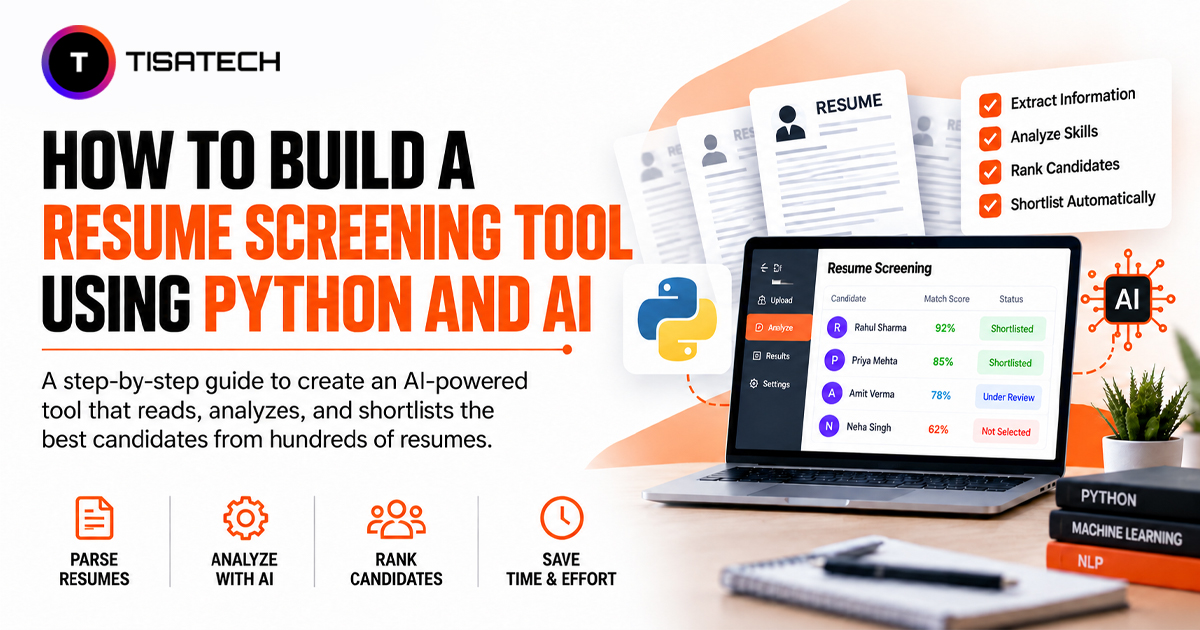
An AI resume screening tool automatically reads resumes and compares each candidate with the job requirements. It identifies details such as skills, work experience, and education, then helps recruiters score or rank candidates based on how well they match the role. This makes the initial screening process easier and helps recruiters focus on relevant applications.
Unlike traditional ATS tools that mainly rely on exact keyword matching, AI-based screening can also consider the meaning behind different phrases. For example, “managed a team” and “led a group of developers” may describe similar experiences even though the wording is different.
The screening process usually follows four stages. First, the tool extracts text from resume files such as PDFs and Word documents. It then cleans the text by removing extra spaces, broken characters, and unnecessary formatting.
Next, the tool compares the resume with the job description using an AI model. It checks the candidate’s skills, experience, and qualifications to identify what matches the role and what may be missing. Finally, the tool returns a score and summary, which may include a match percentage, matched skills, missing skills, and a short explanation of the candidate’s suitability.
Recruitment platforms such as Workday and Greenhouse use similar screening processes at a larger scale, as discussed inJobscan’s breakdown of modern ATS platforms. Using Python and AI, you can build a smaller version of the same process for your own project.
How to Build a Resume Screening Tool Using Python and AI?
This is the part most people search for, so let’s build it step by step. You do not need advanced coding skills. Basic Python knowledge and a bit of patience are enough.
Step 1: Set Up Your Project
Open your terminal and create a new folder for your project. Then set up a virtual environment so your packages stay separate from other projects.
mkdir resume_screening_tool
cd resume_screening_tool
python -m venv venv
venv\Scripts\activate
On Mac or Linux, activate it with source venv/bin/activate instead.
Now install the packages you need. These handle PDF reading, Word document reading, the AI connection, and the web interface.
pip install streamlit PyPDF2 python-docx openai python-dotenvStep 2: Extract Text From Resumes
Resumes arrive as PDF or DOCX files, and your tool needs to read the plain text inside them before it can do anything smart with it. Create a file called parser.py.
from pathlib import Path
import PyPDF2
from docx import Document

class ResumeParser:
	def extract_text(self, file_path):
    	path = Path(file_path)
    	if path.suffix.lower() == ".pdf":
        	return self._read_pdf(path)
    	elif path.suffix.lower() == ".docx":
        	return self._read_docx(path)
    	else:
        	raise ValueError("Only PDF and DOCX files are supported.")

	def _read_pdf(self, path):
    	text = ""
    	with open(path, "rb") as file:
        	reader = PyPDF2.PdfReader(file)
        	for page in reader.pages:
            	page_text = page.extract_text()
            	if page_text:
                	text += page_text + "\n"
    	return text.strip()

	def _read_docx(self, path):
    	doc = Document(path)
    	return "\n".join(p.text for p in doc.paragraphs).strip()
This small class does one job well. It opens the file, checks the format, and hands back clean plain text.
Step 3: Build the AI Scoring Engine
This is where the actual intelligence comes in. You will send the resume text and the job description to an AI model and ask it to return a structured score. Create a file called screener.py.
import os
import json
from openai import OpenAI
from dotenv import load_dotenv

load_dotenv()

class AIScreener:
	def __init__(self):
    	self.client = OpenAI(api_key=os.getenv("OPENAI_API_KEY"))

	def screen_resume(self, resume_text, job_description):
    	prompt = f"""
    	You are a recruitment expert. Compare this resume with the job description.

    	Job Description:
    	{job_description}

    	Resume:
    	{resume_text}

    	Return a JSON object with these keys only:
    	match_percentage, matched_skills, missing_skills, summary, verdict.
    	Respond with valid JSON only, no extra text.
    	"""
    	response = self.client.chat.completions.create(
            model="gpt-4o-mini",
            messages=[{"role": "user", "content": prompt}],
            response_format={"type": "json_object"}
    	)
    	return json.loads(response.choices[0].message.content)
This is the heart of your AI-powered resume screening system. Instead of writing complicated rules for every possible skill and phrase, you let the language model understand meaning and give you a clean, structured answer back.
Step 4: Add a Simple Web Interface
A tool is only useful if people can actually use it. Streamlit lets you build a working web page in a few lines of Python. Create app.py.
import streamlit as st
import os
from parser import ResumeParser
from screener import AIScreener

st.set_page_config(page_title="Resume Screening Tool")
st.title("AI Resume Screening Tool")

parser = ResumeParser()
screener = AIScreener()

job_description = st.text_area("Paste the job description")
files = st.file_uploader("Upload resumes", type=["pdf", "docx"], accept_multiple_files=True)

if st.button("Screen Resumes") and job_description and files:
	results = []
	for file in files:
    	temp_path = f"temp_{file.name}"
    	with open(temp_path, "wb") as f:
            f.write(file.getbuffer())
    	try:
        	text = parser.extract_text(temp_path)
        	result = screener.screen_resume(text, job_description)
            result["filename"] = file.name
        	results.append(result)
    	finally:
            os.remove(temp_path)

	results = sorted(results, key=lambda x: x["match_percentage"], reverse=True)
	for rank, r in enumerate(results, 1):
        st.subheader(f"Rank {rank}: {r['filename']} - {r['match_percentage']}%")
        st.write(r["summary"])
    	st.write("Matched skills:", ", ".join(r["matched_skills"]))
    	st.write("Missing skills:", ", ".join(r["missing_skills"]))
Step 5: Test and Run Your Tool
Create a file named .env in the same folder and add your API key.
OPENAI_API_KEY=your_key_hereNow run the app from your terminal.
streamlit run app.pyPaste any job description, upload a few sample resumes, and click the screen button. Within seconds, you will see every candidate ranked by match score, with their strong and missing skills listed clearly. That is a complete, working resume screening tool using Python and AI, built from scratch.
How to Use AI for Resume Screening the Right Way
Building the tool is only half the job. Using it responsibly is just as important.
Treat the AI score as a starting point, not a final hiring decision. Research from the University of Washington found that some resume screening models can favor certain names or backgrounds. For this reason, a human should review the shortlist before making a rejection decision.
Write clear and detailed job descriptions because the quality of the screening depends on the information you provide. A vague job description can lead to unclear or inaccurate scores.
Human review is also important for candidates close to the cutoff score. For example, a candidate with a 68% score may still be a good fit but may have described their skills or experience using different words.
Finally, handle resumes and personal information securely. Before sending candidate documents to a third-party AI API, understand how the provider processes the data and take appropriate consent and privacy measures, especially when screening real applicants.





Learn to Build Practical AI Applications at TISA-TECH, Jaipur
Building a resume screening tool brings several technologies together in one application. Python handles files, APIs connect external services, and AI models compare and analyze information. Using these technologies together helps students understand how a complete application works.
Students at TISA-TECH can apply their programming knowledge to practical use cases through projects and internship opportunities. Students exploring Python, AI, and machine learning can also follow the AI and Machine Learning course in Jaipur to build the knowledge needed for similar applications.
Project reviews help students identify issues in their code, understand what needs improvement, and make better changes to their applications.
Conclusion
A resume screening tool using Python and AI shows how a simple application can solve a real hiring problem. You do not need a large team or complex software to start. A basic combination of Python, an AI API, and a simple interface can turn resume data into useful screening insights.
The real value of this project goes beyond the tool itself. It helps you understand how to work with files, APIs, AI models, and user interfaces in one application. Start with a working version, test it carefully, and improve it as you learn.
Most importantly, use AI as a support tool rather than a replacement for human judgment. A good resume screening system can save time, but people should still make the final hiring decisions.
Frequently Asked Questions
Ans. Yes. Python is a good choice because it can read PDF and Word files and connect easily with AI APIs. It also makes the tool easier to build and test.
Ans. No. If you use an existing AI model through an API, you do not need to train your own model. Basic Python and API knowledge is enough to start.
Ans. It depends on your project. Models like GPT-4o-mini work well because they can understand context instead of only matching keywords. You can also use open-source models locally through Ollama if you need more control over your data.
Ans. Yes. A small business can build a simple tool based on its hiring needs instead of using an expensive ATS. It can help review and organize a large number of resumes.
Ans. Businesses can use AI to support resume screening, but they should handle candidate data carefully. Keep human involvement in hiring decisions and make sure personal information is processed responsibly.