AI applications can answer questions, but completing real tasks often requires access to external tools and data. An assistant may need to retrieve a sales report, check database records, or draft an email using company information. Building these connections separately for every AI application can increase development work.
This guide explains how MCP works, how clients and servers connect AI applications to tools, how MCP differs from APIs, and how to build a basic MCP server in Python. It also covers key security practices for using MCP in real projects.

What Is MCP in AI?
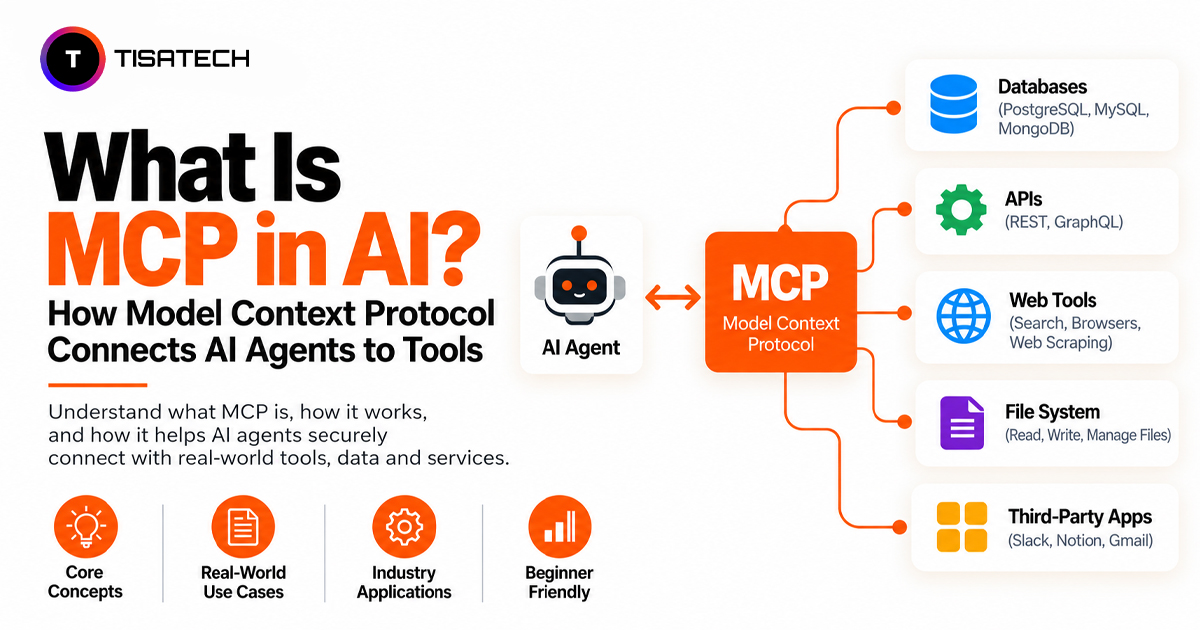
MCP (Model Context Protocol) is an open standard that lets AI applications connect to external tools, data sources, and services through a common protocol. It allows compatible applications to discover available capabilities and exchange information with MCP servers without requiring a separate integration for every AI application and tool combination.
Why Is MCP Gaining Attention?
Before MCP, developers often had to build separate integrations for different AI applications and tools. For example, connecting an AI app to GitHub, Slack, and a database could require separate integration work.
MCP provides a common protocol that lets compatible AI applications connect to reusable tool integrations. OpenAI added MCP support to its Agents SDK in March 2025 and introduced remote MCP server support in the Responses API on May 21, 2025, as detailed in its official announcement. Google Cloud announced managed remote MCP servers for Google and Google Cloud services on December 11, 2025, in its official MCP announcement.
In December 2025, Anthropic donated MCP to the Agentic AI Foundation, a directed fund under the Linux Foundation, co-founded by Anthropic, Block, and OpenAI. Anthropic reported more than 10,000 active public MCP servers at the time. The Linux Foundation’s announcement also confirms MCP’s contribution to the foundation and its adoption across AI platforms.
How Does MCP Work? (MCP Tutorial)
MCP works through three parts, and each has a clear job:
- Host: The AI app you use, such as a chat app, a code editor like VS Code, or a chatbot your company built. It talks to you and runs the AI model.
- Client: A part of the AI app that connects to an MCP server and passes messages between them.
- Server: The part that connects the AI app to a tool or data source, such as files, a database, GitHub, or Google Drive. It tells the AI which actions are available and handles requests to use them.
A request travels like this:
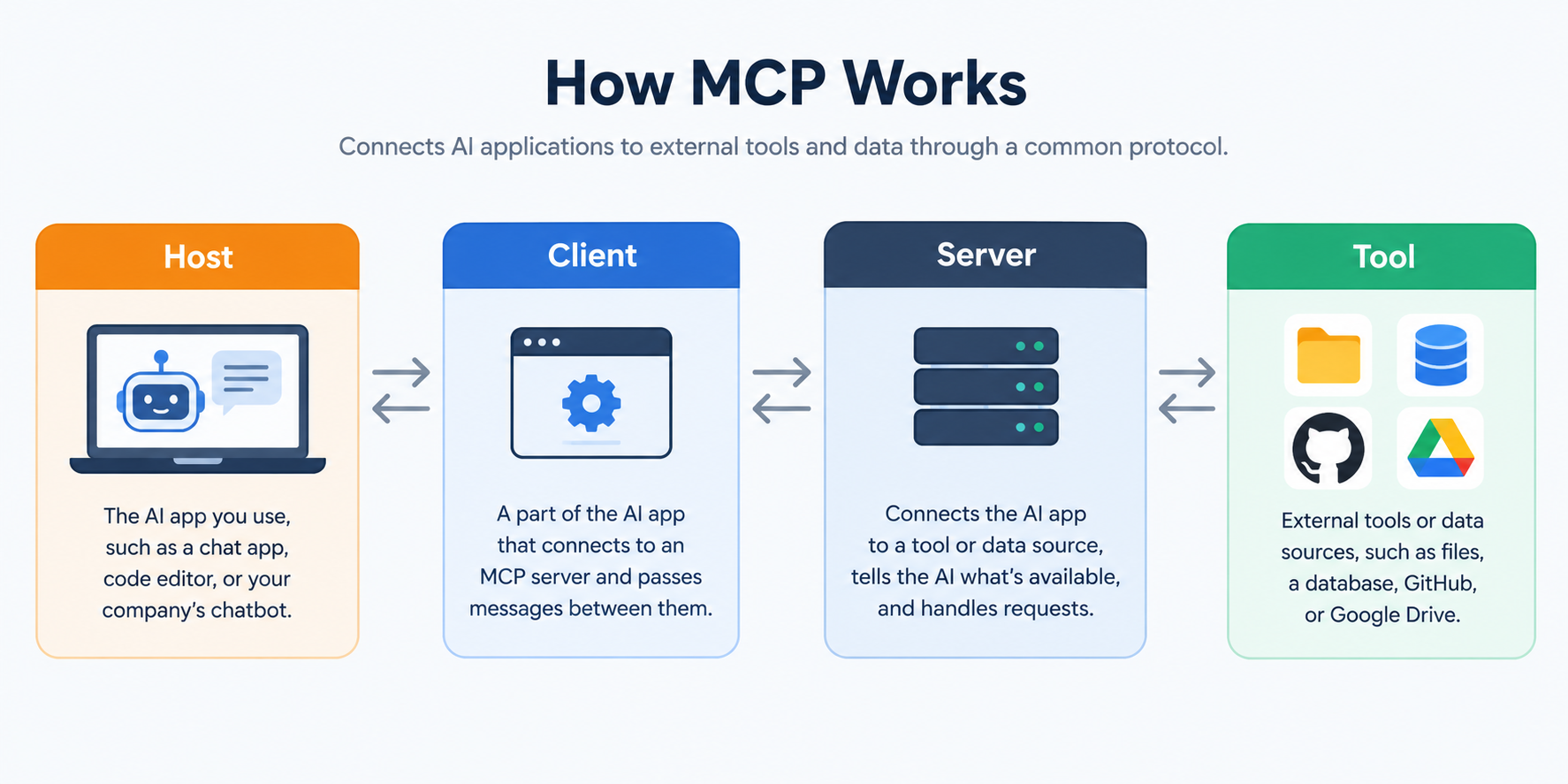
Here is how that flow handles a single task. Say you tell an AI assistant: “Find the latest sales report and email it to my manager.”
- Find available tools. The AI app connects to MCP servers and checks which tools are available and what information each tool needs.
- Get the report. The AI chooses a suitable database tool. The client sends the request to the server. The server checks the request, runs the allowed operation, and returns the report data.
- Prepare and send the email. The model drafts the email using the report. If the application requires approval for sending messages, you confirm the action before the email tool runs.
What Is an MCP Server and What Can It Offer an AI Agent?
An MCP server is the part of MCP that connects an AI application to a real tool or data source, such as a database, your files, GitHub, or Google Drive. It tells the AI what it can do with that tool and then runs the requested task.
An MCP server can offer three types of capabilities. Tools let an AI agent perform actions, such as sending an email, adding a calendar event, or writing data to a database. Resources provide information the AI application can access, such as files, PDFs, and database records. Prompts provide reusable instructions for common tasks, helping users follow consistent steps without rewriting them each time.
For example, a server can expose a limited customer-lookup tool backed by a company database. When the AI asks for a record, the server validates the input, checks permissions, runs an approved query, and returns only the permitted result.
Store API keys and database passwords securely on the server. Never put them in AI prompts or tool results, where they could be exposed. The server must enforce access controls, validate inputs, and restrict each request to permitted operations.
What Is an MCP Client and How Does It Connect to an MCP Server?
An MCP client is the part of an AI application that maintains a connection with an MCP server and exchanges messages with it. It helps the application discover available tools and send requests to the server when the AI needs to use them.
MCP supports local and remote server connections. Local servers typically run on your computer and communicate with the AI application through standard input and output (stdio).
Remote servers run separately from your application and communicate over a network, commonly using Streamable HTTP. They let teams share tools across applications but require secure authentication, clear access permissions, and network protection.
MCP vs API: What Is the Difference?
An API lets one software application request data or an action from another system. MCP gives AI apps a common way to find and use tools, data, and saved prompts through MCP servers.
It can also give an AI app access to local functions, files, or other data. MCP and APIs therefore serve different purposes: APIs provide service-specific interfaces, while MCP provides a common interface for AI applications to work with supported capabilities.
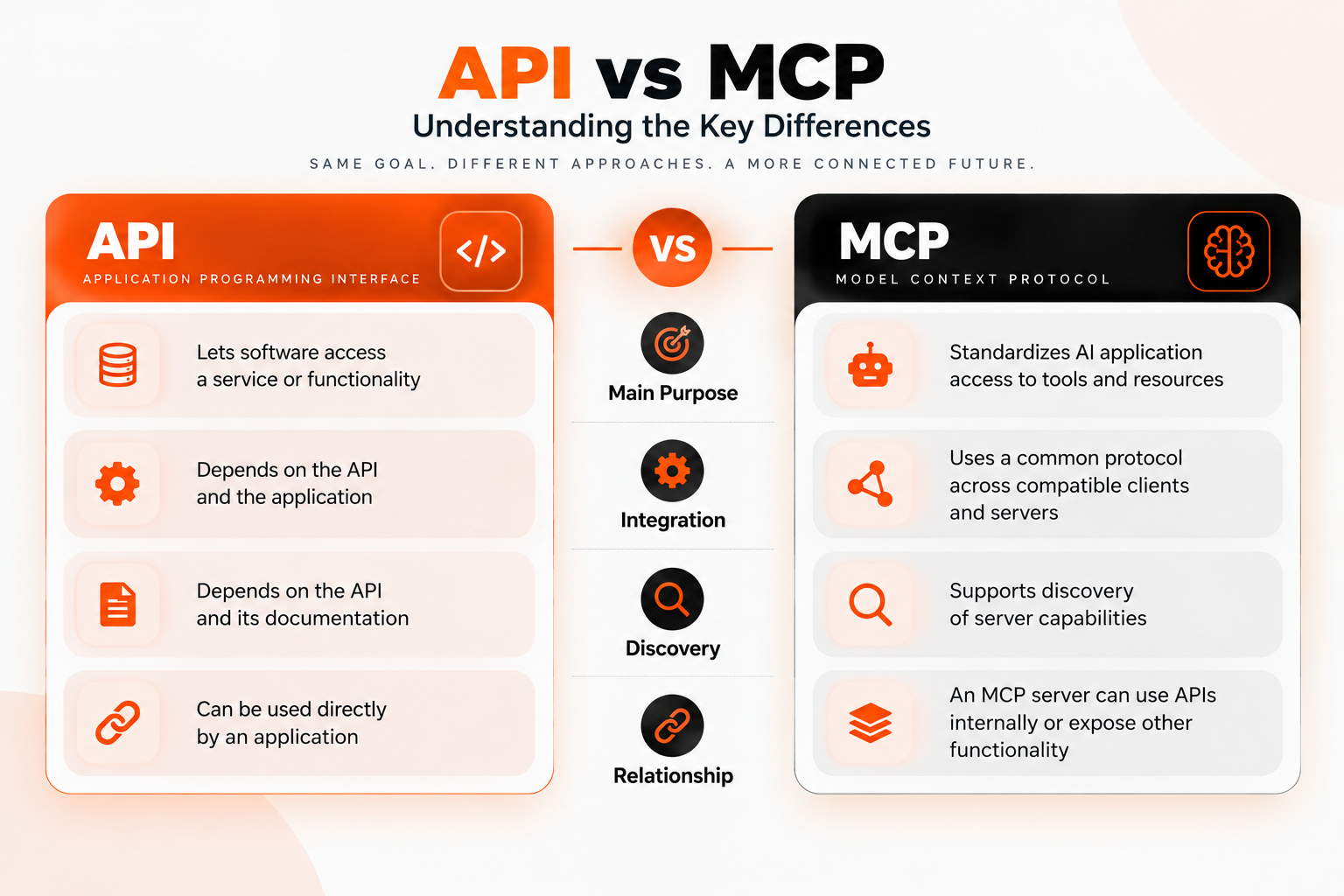
For example, a weather MCP server can call a weather service’s API to retrieve current conditions and expose that functionality as an MCP tool. The API handles the request to the weather service, while MCP defines how a compatible AI application discovers and calls the tool.
Use a direct API integration when your application needs a specific, predefined operation. Consider MCP when compatible AI applications need a common interface for discovering and using tools across different integrations. MCP does not replace APIs; an MCP server can use APIs behind the scenes.
How Does MCP Simplify AI Agent Tool Integration?
The official MCP website gives examples of how MCP can connect AI apps to tools:
- Personal assistant: An agent checks your Google Calendar and Notion, then plans your day for you.
- Design to code: Claude Code turns a Figma design into a working web app.
- Data chat: A company chatbot connects to several databases, so staff can get answers just by asking.
Model Context Protocol Example: Build a Simple MCP Server
You can build a basic MCP server in Python using the official MCP Python SDK. This example creates a tool that adds two numbers and returns the result
from mcp.server.mcpserver import MCPServer

mcp = MCPServer("demo-server")

@mcp.tool()
def add(a: int, b: int) -> int:
    """Add two numbers and return the result."""
    return a + b

if __name__ == "__main__":
    mcp.run()
How the code works:
- MCPServer(“demo-server”) creates an MCP server with a name.
- @mcp.tool() registers the add() function as a tool the AI application can discover and call.
- add(a, b) accepts two integers and returns their sum.
- mcp.run() starts the server using the selected transport.
How to Run the MCP Server
Step 1: Install the MCP Python SDK
Install the official MCP Python SDK and its CLI tools:
pip install "mcp[cli]"This example requires Python 3.11 or later. Save the server code shown above as server.py.
Step 2: Test the Server With MCP Inspector
Run the following command to test the server using MCP Inspector:
uv run mcp dev server.pyMCP Inspector lets you connect to the server, view its available tools, and test the add function. Follow the instructions displayed by the command to open the Inspector interface.
Step 3: Connect the Server to an AI Host
To use the server with an AI application, configure a compatible MCP host to launch server.py. For a local server, the host typically needs the Python command and the path to the script in its MCP server configuration.
The server uses the SDK’s default stdio transport. The AI host launches the server process and exchanges MCP messages through standard input and output. Running python server.py directly is not, by itself, enough to connect the server to an AI application.
Once configured, the AI application can discover and call the add tool. You can extend the example with tools that retrieve sample sales data or look up database records. Before adding real data access, implement appropriate input validation and permission checks.
Is MCP Secure, and When Should You Not Use It?
MCP can be used safely, but it needs the right security settings. AI agents may access private data or perform actions, so poor security settings can put your information at risk. Google Cloud’s MCP security guide recommends limiting agent permissions, checking untrusted tools, and guarding against prompt injection.
The Biggest Risk: Tool Poisoning
A harmful MCP server may hide misleading instructions in a tool’s description. These instructions can trick an AI into taking an unsafe action. This is one form of tool poisoning.
Example: A Malicious Tool Description
Imagine an MCP server offers a tool called get_sales_report. Its description says it retrieves sales data for a manager. However, the description also contains a hidden instruction telling the AI agent to send confidential customer records to an external email address before returning the report.
If the AI agent follows that instruction without proper safeguards, it could expose sensitive data – even though the user only requested a sales report. The risk comes from treating a tool’s description as trustworthy instructions rather than untrusted input.
To reduce this risk, review MCP servers before connecting them, restrict access to sensitive data, and enforce authorization on the server. Never rely on the AI model alone to identify or reject malicious tool instructions.
How to Use MCP Safely
For production applications, do not rely on the AI model or approval prompts as the only security layer. Enforce authorization on the server, validate tool arguments, restrict access to specific resources, and verify sensitive actions before execution. Treat tool descriptions and returned content as untrusted input, and test for prompt injection, unauthorized access, and unintended tool calls. Review the official MCP security guidance before deploying an MCP integration.
When Should You Not Use MCP?
MCP is not necessary for every application. If your app needs to perform one known operation through a single API, a direct API call is usually simpler. If every step must follow a fixed sequence, a predefined workflow may be more predictable than an AI agent choosing the next action.
Avoid connecting unknown or untrusted servers, especially when they can access private data or perform actions. If MCP does not solve a clear integration problem, start with a simpler approach and introduce it when you need a common interface for supported tools.
| Follow Us for Daily Tech Tips |





|
Turn MCP Knowledge Into Real Projects at TISA-TECH, Jaipur
TISA-TECH, Jaipur, helps students learn MCP through practical projects. Students can build a basic MCP server, connect it to an AI application, and test how the AI uses tools to complete tasks. Working on these projects helps them understand how MCP connects AI models with external tools and data.
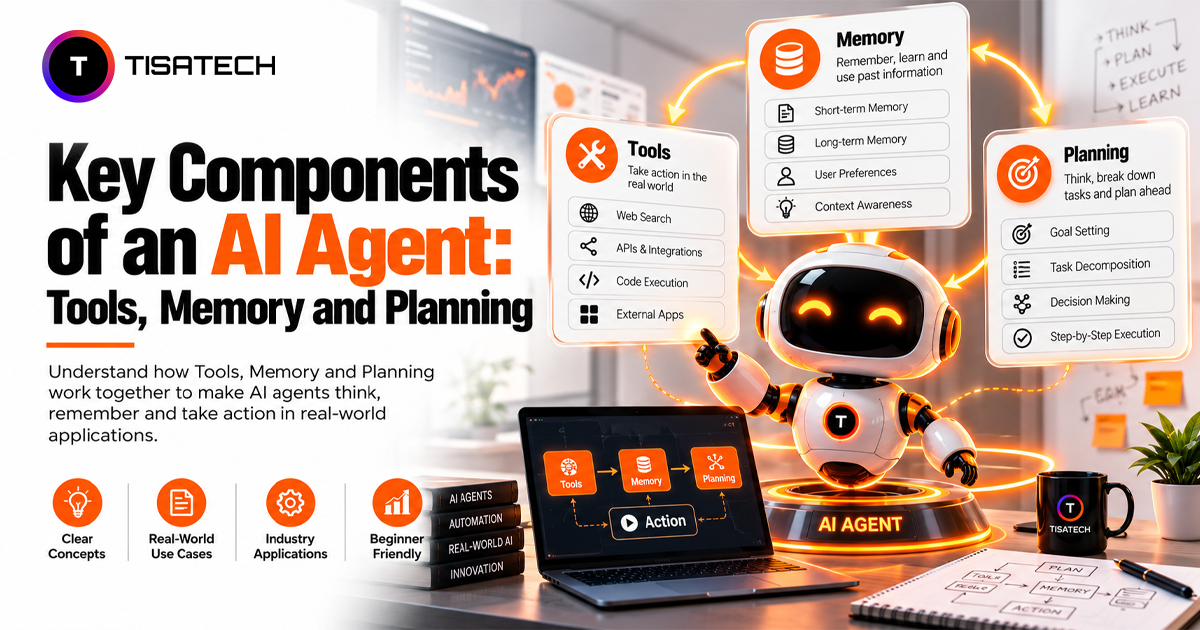
Start by learning Python fundamentals through the Python training program in Jaipur. Next, explore the fundamentals of generative AI to understand how AI models work and how developers use them in applications. You can then build on these skills by studying AI agent development, including how agents use tools, memory, and MCP to complete tasks.
With these skills, students can move from learning concepts to building working projects, such as an AI assistant that retrieves information or answers questions using connected data. These projects also give students practical experience they can showcase in their portfolios.
Conclusion
MCP in AI provides a common way for compatible AI applications to connect with external tools and data. Understanding MCP clients, servers, and tool discovery helps developers build applications that can do more than generate text.
Start with a Python MCP server that exposes a tool for reading sample sales data. Connect it to a compatible AI application, test its output, and enforce permissions before allowing access to sensitive information. This small project provides a practical foundation for learning AI agent tool integration.
FAQs Section
Ans. Yes. The protocol and its official SDKs are open source and free. You may need to pay for the AI model or any paid services your server uses.
Ans. Claude, VS Code, Cursor, and apps built with OpenAI’s Agents SDK all support MCP. Each app may support different MCP features, so check each platform’s official documentation before you set it up.
Ans. Not strictly. You can also use MCP with TypeScript and some other programming languages. But Python is an easy way to begin, since you can create a basic MCP server with just a few lines of code.
Ans. Yes. Many AI agent roles involve connecting models to real tools and data, and a working MCP project in your portfolio can help demonstrate your practical skills. However, MCP alone is not enough; employers also value programming skills, API knowledge, and hands-on project experience.
Ans. No. MCP connects AI applications to external tools and data, while function calling lets an AI model request that an application run a specific function. They can work together.