Every day, thousands of students in Jaipur start their first coding project. They build a small app. Then someone asks one simple question. Where do you store the data? Two words appear everywhere. SQL and NoSQL. Most beginners freeze right here.
This confusion is real and common. According to the Stack Overflow Developer Survey 2024, PostgreSQL is used by 48.7% of developers worldwide, the most popular database for the second year in a row. MySQL follows at 40.3%, and MongoDB, the top NoSQL option, sits at 24.8%. SQL still leads, but NoSQL keeps growing fast because modern apps need speed and flexibility.
A few years back, companies had only one real option. They used SQL because it was the standard. Then data started changing shape. Social posts, chat messages, and sensor data stopped fitting neatly into rows and columns. Large platforms needed something faster, so NoSQL databases like MongoDB grew popular.
Today you do not need to pick a side blindly. You just need to understand both systems and choose the right one. This database tutorial for beginners explains SQL and NoSQL in plain language, like your database design for beginners complete guide, written for someone starting from zero.

What is SQL and How Does a Relational Database Work?
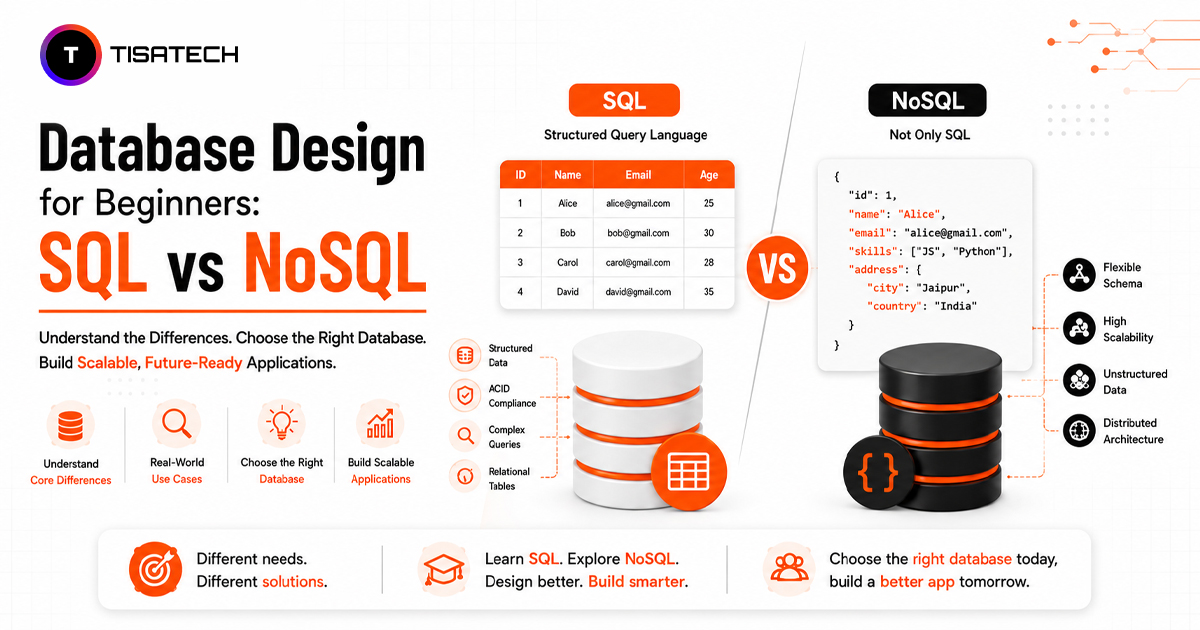
SQL stands for Structured Query Language. It is used to store, manage, and read data in relational databases. These databases keep data in tables with rows and columns, similar to an Excel sheet.
For example, a college can keep student details in one table and marks in another. Both tables can connect through a common value like a student ID or roll number. This connection between tables is called a relationship, which is why SQL databases are called relational databases.
SQL databases usually follow a fixed structure called a schema. It defines what information each table stores and what type of data each column accepts. Popular SQL databases include MySQL, PostgreSQL, and SQLite. They work well for data with clear relationships, such as student records, orders, payments, and banking systems.
What is NoSQL and How Does a Non-Relational Database Work?
NoSQL means Not Only SQL. Unlike SQL databases, NoSQL does not depend only on fixed tables with rows and columns. It can store data as documents, key-value pairs, graphs, or other flexible formats.
For example, an app like Instagram handles different types of content. One post may have an image and caption, while another may include a video, location, or extra details. A document-based NoSQL database can store this changing data easily because every record does not need the same fields.
This flexible structure is why NoSQL is called a non-relational database. Popular examples include MongoDB, Cassandra, and Redis. NoSQL works well when data changes often or an application needs to handle large amounts of traffic and data.
What is the Real Difference Between SQL and NoSQL?
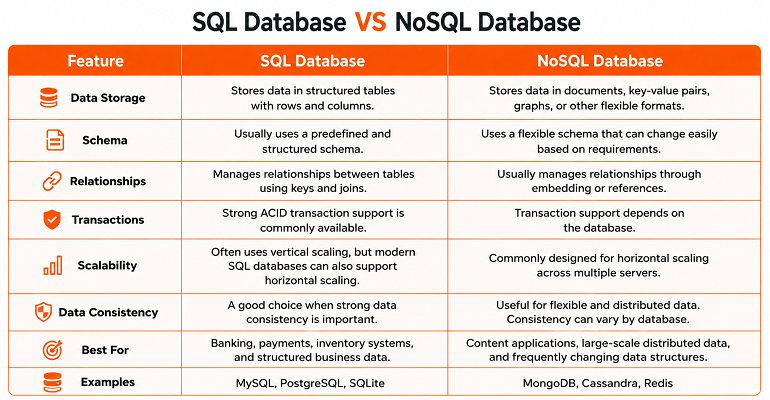
SQL and NoSQL databases store and manage data in different ways. The right choice depends on your data structure, relationships, scalability needs, and how often your data changes. The table below shows the main differences between SQL and NoSQL in a simple way.
How Do You Choose Between SQL and NoSQL for Your First Project?
Choosing between SQL and NoSQL for your first project should depend on your data and project needs, not on what is trending.
- If your data has clear relationships, such as students and marks, customers and orders, or products and inventory, SQL usually works better. It is also a good choice when accuracy and reliable transactions matter, such as in payments or banking systems.
- If your data structure changes often or different records need different fields, NoSQL may be a better fit. Social media posts, reviews, and content-based apps are common examples.
For most beginners, SQL is a better starting point because it teaches tables, relationships, keys, and structured data clearly. Once these basics are clear, understanding NoSQL becomes much easier.
How Do You Set Up SQL and Install MySQL on Your Computer?
Setting up SQL on your computer is easier than most beginners think. Here is how to set up SQL using MySQL, one of the most beginner friendly options available.
First, visit the official MySQL website and download MySQL Community Server for your system. Next, run the installer and pick the default setup type, since it covers everything a beginner needs. During installation, MySQL asks you to set a root password. Remember this password, because you need it every time you open MySQL.
After installation, open MySQL Workbench. This visual tool lets you create databases and tables without typing complex commands. Click the plus icon, create a new connection, enter your root password, and you are ready to start. This is exactly how to install MySQL step by step, even if you have never touched a database before.
What Does Your First Database Design Guide Look Like?
Every database design starts with a simple plan, no matter which database you choose. First, list the real-world objects you want to store. For a college project, this could include students, courses, and marks.
Next, decide what information each object needs. A student may need a name, roll number, and email. A course may need a name and code. Then decide how these objects are connected. For example, one student can take many courses, and one course can have many students.
Finally, build your tables or documents based on this plan. In SQL, you create separate tables and connect them using keys. In NoSQL, you can store related information together in a single document. This planning creates a strong base for good database design.





Where Can Jaipur Beginners Learn Database Design the Right Way?
For beginners, database design becomes easier when they learn through real practice instead of only reading definitions. Creating tables, planning relationships, and building schemas help students understand how databases actually work.
TISA-TECH follows a project-based approach where students learn how to choose between SQL and NoSQL, structure data properly, and connect databases with real applications. This practical experience also helps them develop useful backend development skills.
Students work on assignments and real project tasks where they can apply these concepts step by step. During this process, personalized mentor support helps them clear doubts, correct mistakes, and understand how to use databases more confidently in development projects.
Conclusion
SQL and NoSQL are not rivals. They are two tools built for different jobs. SQL works well when you need structured data, clear relationships, and strong accuracy. NoSQL is useful when your data changes often or your application needs more flexibility.
This database tutorial for beginners explained the basic meaning of SQL and NoSQL, their key differences, MySQL setup, and the steps to plan your first database.
Start with a simple database and practice with real data. Create a table or document, test how it works, and improve it as you learn. Regular practice is the best way to build strong database design skills.
FAQs Section
Ans. SQL stores data in structured tables with rows and columns. NoSQL stores data in flexible formats such as documents, key-value pairs, or graphs. SQL works well for structured data, while NoSQL is useful when data changes often.
Ans. SQL is usually a better starting point for beginners because it teaches basic database concepts, relationships, and queries clearly. MySQL is a simple and popular option to begin with.
Ans. Yes. MySQL Community Edition is free to download and use. Beginners can install it on their system and practice database creation, queries, and basic project work without paying.
Ans. Yes. Many applications use both database types for different needs. SQL can manage structured data, while NoSQL can handle flexible or frequently changing data in the same project.
Ans. A beginner can understand the basics of database design within a few weeks with regular practice. Working on small projects helps make concepts like tables, relationships, schemas, and queries easier to understand.
Ans. Not necessarily. The better choice depends on the type of project and data. Beginners usually find SQL easier to start with because its structured format makes basic database concepts easier to understand.